Overview
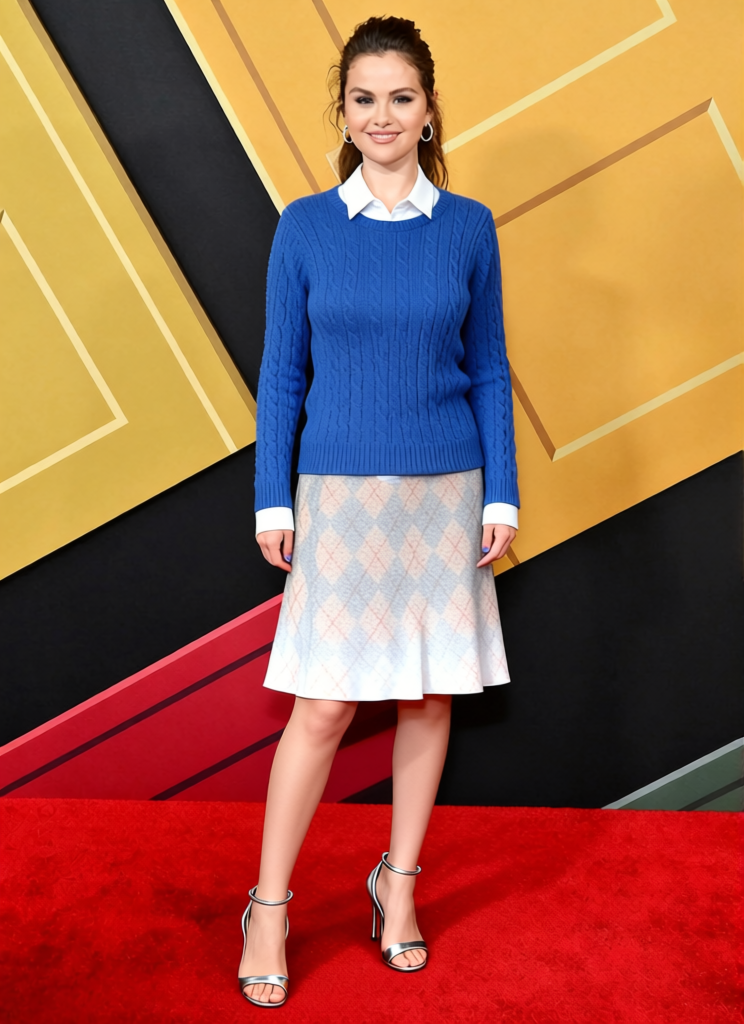
The Andy Sachs Blue Sweater Newsroom Outfit template allows you to virtually try on the iconic blue sweater outfit from "The Devil Wears Prada" movie. This AI Clothes Changer template uses advanced technology to alter your appearance in photos without needing a physical wardrobe change.
What It Does
Transform your everyday photos with a stylish twist. This template replaces your clothes with the blue sweater outfit, ensuring a seamless fit and natural look. It's a fantastic tool for fashion enthusiasts, bloggers, or anyone who wants to experiment with styles without committing to a purchase.
You might also be interested in our AI Profile Picture Generator to complement your new look with a perfect profile shot.
Who It's For
This template is perfect for fashion bloggers, costume designers, actors, and influencers looking to diversify their online personas. Whether preparing for a themed photoshoot or testing out your styling ideas, this tool streamlines the creative process by offering a virtual wardrobe.
For those into more dynamic changes, explore our Character Replace tool to completely transform appearances in videos as well.
Summary
With the Andy Sachs Blue Sweater Newsroom Outfit template, you can easily upgrade your look in photos with a famous movie outfit. Designed for flexibility and creative exploration, this clothes changer offers high-quality results that cater to both creative professionals and casual users.
How to Use It
Choose Template

Customize Your Image

Generate & Download

Use Cases
Fashion Blogging
- Cost-effective outfit trials
- Quick styling for content
Movie-Themed Events
- Photoshoots with thematic clothing
- No physical costume needed
Social Media Content
- Stand out in your feed
- Try trending styles easily
Best Practices
Use High-Quality Images
For the best results, always use clear, high-resolution photos.Check Positioning
Make sure your body positioning in the photo suits the overlay for a natural look.Be Creative With Context
Try different settings to see how the outfit works with varied backgrounds.