Overview
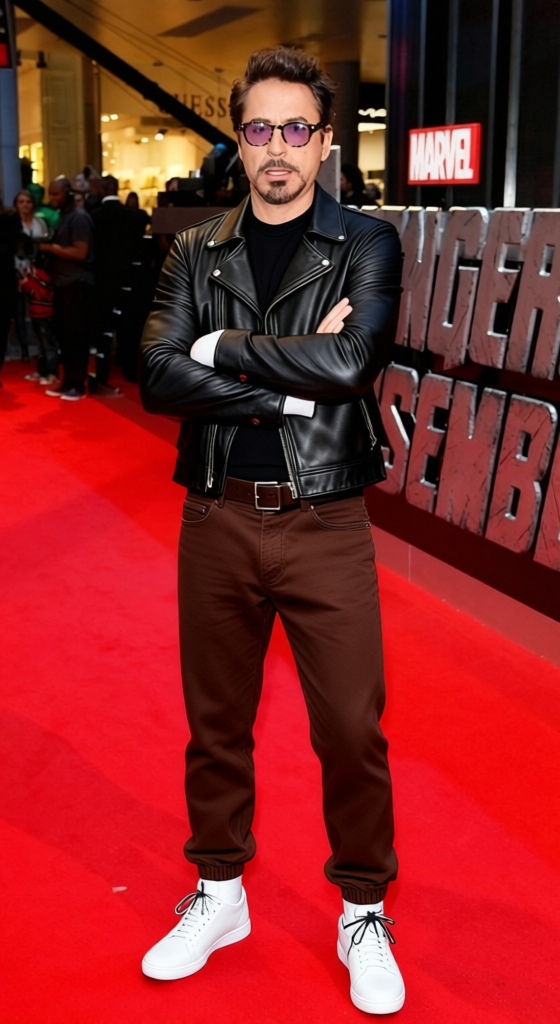
The Trent Reznor All Black Industrial Outfit template transforms any attire into a striking, industrial-style outfit reminiscent of Trent Reznor's unique fashion. This AI Clothes Changer tool offers a dynamic way to experiment with your wardrobe by applying an all-black aesthetic for a bold, modern look.
What It Does
This template employs AI technology to replace the clothing in your chosen image with an industrial outfit. Using advanced pattern recognition, it seamlessly integrates an all-black style, complete with textures that suggest leather and metal. The output is a high-quality image file.
For additional customization options, the AI Image Editor provides tools for further image refinement.
Who It's For
Ideal for fashion enthusiasts and designers seeking inspiration from industrial music icons, this template is perfect for creating mood boards or visual experiments. Whether you're a musician, stylist, or marketer, get ready to explore edgier attire options with ease.
For a complete revamp that includes facial transformations, combining this template with the Face Swap tool might be the perfect solution.
Summary
The Trent Reznor All Black Industrial Outfit template is an AI-driven solution for quickly changing clothing styles in photos. It emphasizes a distinctive industrial aesthetic, allowing users to explore new looks without physical garments. From fashion design to personal branding, transform your visuals with just a few clicks.
How To
Choose Your Image

Customize Your Look

Generate Your New Image

Use Cases
Fashion Design Mood Boards
- Industrially inspired collections
- Edgy personal styling
Marketing and Branding
- Creative advertisements
- Unique social media content
Music and Performance
- Album cover designs
- Band promotional materials
Best Practices
Choose High-Quality Images
Upload high-resolution images for the best results, ensuring that the details of the new outfit are clear and impactful.Consider Lighting and Angles
Images with balanced lighting and clear angles will result in more realistic outfit transformations.Experiment with Textures
Leverage the tool's ability to add different textures for a more authentic industrial look, enhancing details like leather and metal.