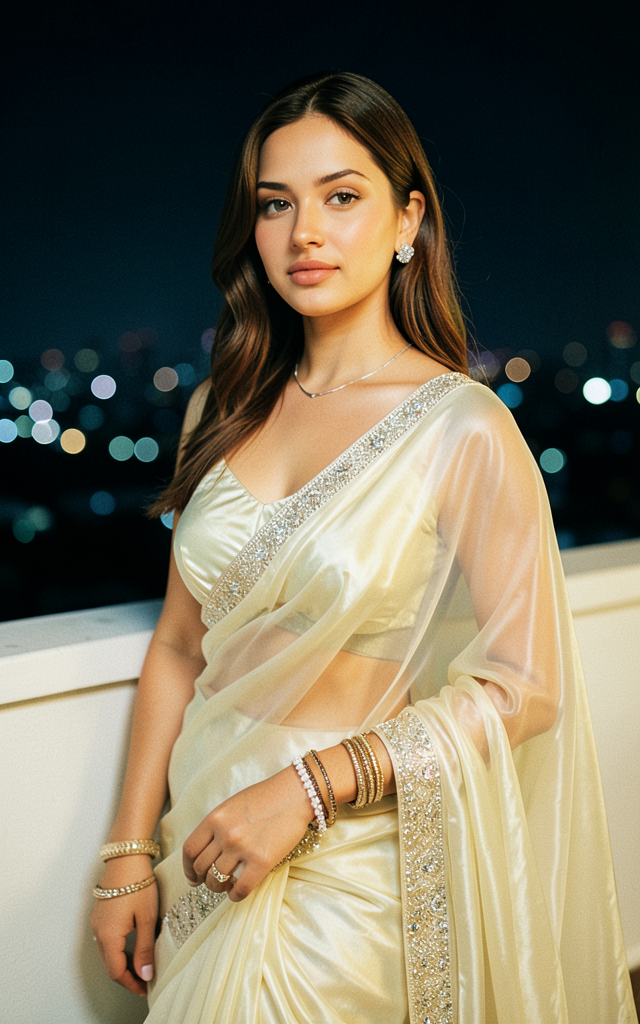
Saree
Any aspect ratio
Create a highly photorealistic image featuring the character from the first photo with exact matching facial features, skin tone, hair, and body proportions, maintaining realistic anatomy without stylization or changes. Dress the character in the light ivory-milky Indian saree from the second photo, made of semi-transparent, softly glowing silky fabric with dense, flowing draping that elegantly hugs the waist and hips, highlighted by a refined shimmering embroidered border and crystal details. Include a simple matching choli top with clean lines and a subtle shine. The jewelry should be delicate and minimalistic—thin necklace, neat bracelets, and elegant earrings—complementing without overpowering. Set the scene on a softly lit nighttime terrace balcony, with a smooth white low parapet wall in the foreground and blurred city lights bokeh in the dark sky background. Use a slightly elevated camera angle focusing from waist to hips, shallow depth of field emphasizing the face, jewelry, and fabric texture, with warm cinematic terrace lighting casting soft highlights and controlled shadows for volume and silhouette separation. Apply filmic color grading with warm highlights, gently glowing skin, cool shadows, refined contrast, subtle grain, and elegant tonal balance, emphasizing a fashion-editorial and cinematic softness without any text or watermarks.
Overview
The Saree AI Image Editor template utilizes the flux-2-klein model to transform an image actor into a traditional Indian saree-wearing figure. This template focuses on maintaining photorealistic details, ensuring that the character's original facial features, skin tone, and body proportions are perfectly preserved.
What It Does
By leveraging advanced image editing capabilities, this template allows you to dress a character in a highly detailed saree without altering their core features. The saree, matched precisely to the second provided photo, comes with intricate embellishments and a glowing fabric finish. The setting is crafted on a nighttime terrace, offering an elevated, cinematic look enhanced by warm lighting and a sharp focus on fabrics and accessories.
To further explore creative possibilities for your generated images, you might also want to try our AI Clothes Changer product, which provides additional flexibility in transforming attire in images.
Who It's For
This template is a perfect choice for fashion designers, photographers, and content creators aiming to visualize traditional fashion in a modern context. It's ideal for those looking to integrate realistic cultural attire into promotional content or enhance personal imagery with a touch of artistic flair. Explore more creative editing with our AI Image Editor product for versatile image enhancements.
Summary
The Saree AI Image Editor template offers a comprehensive tool for creating stylish, photorealistic images dressed in cultural sarees, ensuring every detail from lighting to embroidery is finely tuned. This tool is an excellent resource for anyone looking to produce editorial-quality images with elegant fashion themes.
How To
Choose the Template

Customize Inputs

Generate Your Image

Use Cases
Fashion Editorials
- Capture cultural essence in modern editorials
- Visualize design concepts for client presentations
Social Media Content
- Engage audience with unique visual storytelling
- Stand out with high-quality fashion posts
Virtual Styling
- Provide digital wardrobe trials
- Expand virtual boutique offerings
Best Practices
High-Quality Inputs
Ensure both the character and saree images are of high resolution to maximize detail retention.Scene Compatibility
Consider the lighting and setting of the original images to match the template's terrace backdrop effectively.Complementary Edits
Utilize the template's lighting and color grading options to enhance visual depth and realism.