Bday Pink
Any aspect ratio
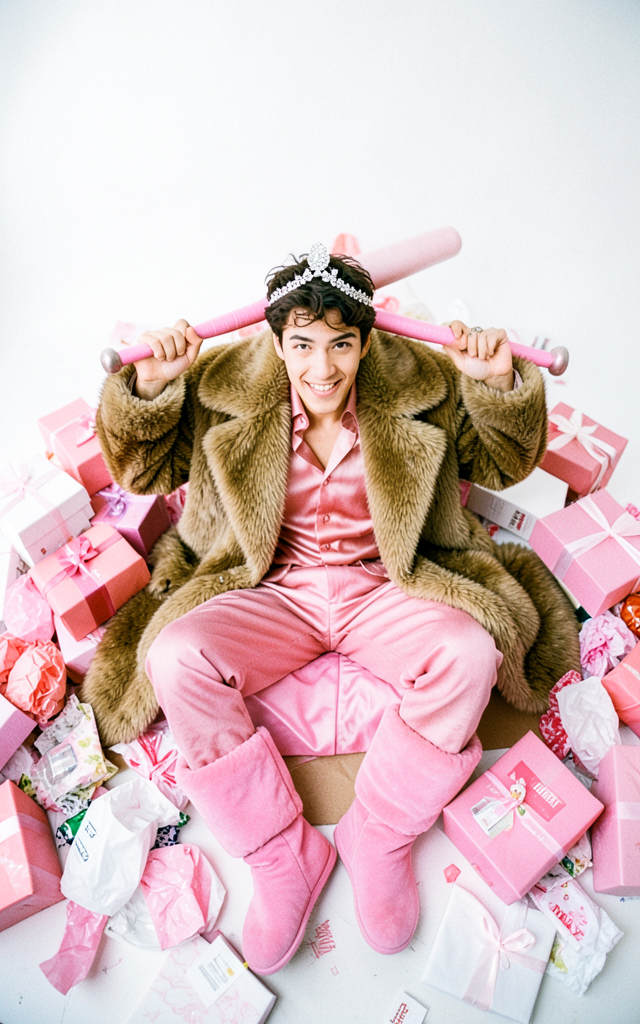
Shot from above using a 24mm wide-angle lens, a handsome male model sitting on the floor surrounded by a chaotic pile of pink and white gift boxes and wrapping paper, wearing puffy pink moon boots, a luxurious vintage fur coat and a pink silk outfit, with a shiny diamond jewelry on his head, holding a pink baseball bat on his shoulders, looking at the camera with a mischievous, rebellious smile, a chaotic after-party atmosphere, dynamic composition, distorted perspective, soft focus, dreamy atmosphere, clean white background, analog photography style, Kodak Portra 400 If there is a woman in the reference, adapt the prompt to her
Overview
The "Bday Pink" template on Magic Hour leverages the capabilities of the AI Image Editor using the flux-2-klein model. Capture the essence of a birthday celebration with a stylish, artistic twist. This template allows you to create visually stunning images featuring a dynamic party atmosphere, all within an analog photography style.
What It Does
The "Bday Pink" template transforms your images into a playful, party-themed celebration. It applies a distorted, dynamic composition focusing on a subject surrounded by pink accessories and wrapping paper. Using this template, images are rendered with a Kodak Portra 400 feel, enhancing them with a soft focus and dreamy atmosphere.
Explore other features of our AI Image Generator to see how you can expand your creative toolbox.
Who It's For
This template is perfect for photographers, content creators, and marketers looking to infuse their work with a touch of rebellion and youthful exuberance. It's also ideal for anyone who enjoys the AI Clothes Changer for fashion-oriented transformations or those engaging in creative projects.
Summary
With "Bday Pink," users can transform images into vibrant, professionally-styled scenes, capturing the chaotic beauty of a party aftermath. Its features are designed for those who appreciate analog style and dynamic composition. Make sure to utilize the functionalities of the Face Swap for further facial modifications and character personalization.
How To
Choose the Template

Customize Your Inputs

Generate Your Image

Use Cases
Fashion Editorials
- Fashion magazines
- Photo blogs
- Social media promotions
Birthday Invitations
- Custom cards
- Online invitations
- Social media posts
Social Media Campaigns
- Instagram posts
- Facebook ads
- Pinterest boards
Best Practices
Maintain Theme Consistency
Ensure the accessories and attire in the image complement the chaotic pink and white theme for a cohesive look.Focus on Dynamic Composition
Use the wide-angle perspective to emphasize the vibrant party atmosphere, drawing attention to key elements.Experiment with Textures
Enhance the final image by playing with textures that mimic analog photography to add depth and intrigue.