Monarch Muse
Any aspect ratio
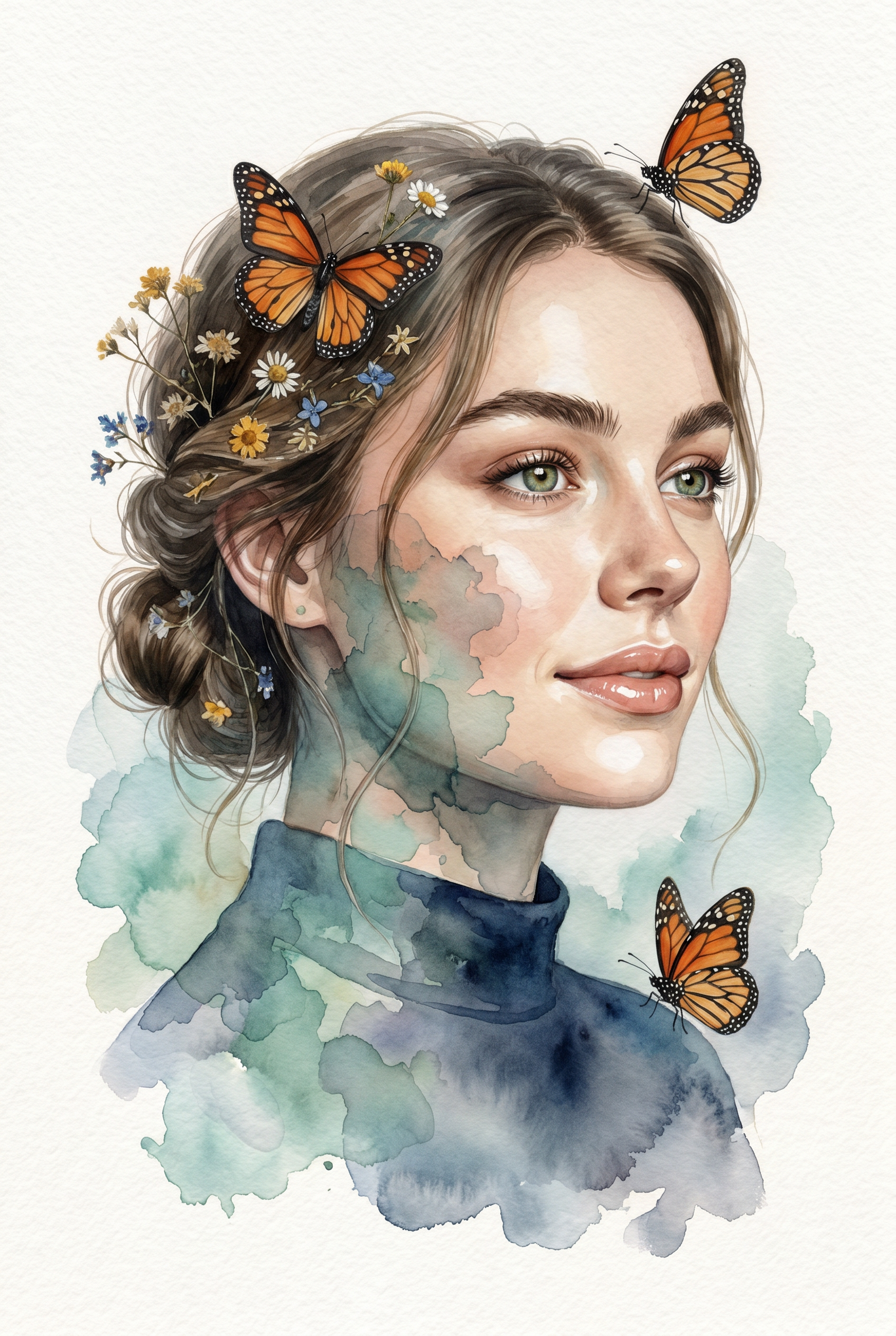
Create a 2:3 vertical premium mixed-media watercolor portrait on off-white cold-pressed watercolor paper. Use the uploaded image only as the subject reference. Keep the subject’s natural features, overall appearance, and recognizable look intact, but do not let the image turn into a generic painted character. Show the subject in a bust-length three-quarter profile, facing slightly toward the viewer’s right, with the gaze directed softly off-camera. Keep the expression calm, warm, serene, and naturally pleasant, with a subtle gentle smile and bright relaxed eyes. The mood should feel elegant, fresh, dreamy, and refined — not sad, blank, tired, or overly serious. Keep the face highly realistic and softly photorealistic, not fully painted, not sketch-like, and not cartoonish. The face should be the main focal point. Use soft diffused natural-looking light, similar to indirect window light, to gently illuminate the forehead, nose bridge, cheeks, lips, and jawline, with delicate depth and soft shadows. Render realistic eyes with soft catchlights, defined brows, natural lips, smooth skin transitions, and fine hair strands. Style the hair in an elegant loose low updo / low messy bun at the nape, with a few soft tendrils framing the face and neck. Intertwine subtle rustic botanical accents in the hair — tiny dried wildflowers in muted yellow, white, and blue tones — delicate, understated, and premium. Add several detailed Monarch butterflies with vivid orange wings, black veins, black borders, and tiny white spots. Keep them crisp, refined, and slightly dimensional. Place multiple butterflies naturally around the portrait: some resting in the hair, one near the upper-right side, and others floating around the shoulders and lower frame. Their warm orange color should stand out beautifully against the cool watercolor tones. Create a strong mixed-media double-exposure effect where parts of the portrait dissolve into watercolor blooms. This effect must be clearly visible across selected parts of the cheek, temple, jawline, neck, shoulder, and lower clothing area — not only in the background. The watercolor should feel translucent and layered over the realistic portrait, so the subject remains clearly realistic underneath. Use expressive watercolor washes in muted teal, seafoam green, dusty blue, soft gray, charcoal, and deep navy tones. Let the washes bloom naturally into the paper with wet-on-wet behavior, soft transparent bleeding, irregular edges, subtle blooms, and a few darker pooled edges where pigment appears to have dried. Allow the watercolor to expand organically into the negative space while keeping the face as the sharpest and most detailed focal area. Dress the subject in a simple deep navy-blue top / blouse with a high rounded neckline and soft gathered or finely pleated texture around the shoulders and upper chest. The garment should look minimal, elegant, matte, and plain, with no collar, no buttons, no printed pattern, and no decorative embellishments. Keep the outfit close to the reference look. Let the lower portion of the top gradually dissolve into blue-gray watercolor splashes. Preserve the contrast between hyper-detailed realism and loose abstract watercolor forms. The final artwork should feel like a luxury fine-art portrait print that combines: photorealistic portraiture abstract watercolor fusion soft ethereal surrealism crisp butterfly detailing cool watercolor tones contrasted with vivid orange butterflies textured watercolor paper and handcrafted mixed-media realism Overall, the result should feel poetic, airy, elegant, and premium, with the viewer’s eye drawn first to the realistic face, then to the translucent watercolor overlays and butterflies surrounding the subject.
Tags
stylesOverview
Monarch Muse is an AI Image Editor template that allows creators to transform a simple photograph into a premium watercolor portrait. Using the power of the nano-banana-pro model, this template delivers high-fidelity results with a unique mixed-media style. It perfectly balances detailed realism and artistic watercolor effects, bringing an ethereal touch to your portraits.
What It Does
This template creates a stunning 2:3 vertical watercolor portrait by enhancing your uploaded photo, keeping the subject's natural traits intact while integrating captivating watercolor blooms and Monarch butterflies. The subject is shown in a bust-length three-quarter profile, with a serene expression illuminated by soft, natural light. The watercolor elements blend seamlessly with the subject, creating a refined mixed-media effect.
The AI Image Editor focuses on rendering the subject's face with hyper-realistic details while dissolving parts of the portrait into expressive watercolor washes. This fusion of photorealism with abstract watercolor forms provides a truly artistic portrayal.
Who It's For
Monarch Muse is designed for artists, photographers, and designers seeking to add an artistic, mixed-media touch to their portrait projects. It's perfect for those who want a luxury fine-art print look, making it ideal for product videos, explainer videos, or enhancing UGC ads. It's also suitable for content creators looking to highlight their creativity with a combination of realism and surrealism.
Summary
Monarch Muse offers an unparalleled opportunity to elevate your portrait creations with its mixed-media watercolor effect. This template keeps your subject's realism at the forefront while enhancing it with a dreamy watercolor overlay. The addition of vivid Monarch butterflies adds a striking contrast to the cool watercolor tones. Whether you're crafting artwork for galleries or digital content, this tool provides a creative edge.
How to Use
Choose Your Template

Customize Your Inputs

Generate Your Portrait

Use Cases
Fine Art Portraits
- Luxury fine-art print
- Vivid watercolor effects
Product Marketing
- Add visual interest
- Stand out in promotions
Editorial Pieces
- High aesthetic value
- Engage readers
Best Practices
Select Clear Reference Images
Ensure the uploaded photo has a well-lit, uncluttered background and the subject's natural appearance is intact.Focus on Composition
Adjust the subject's angle to align with the template's composition guidance for a balanced and appealing portrait.Experiment with Light
Play with lighting prompts to enhance the subject's features and achieve the desired mood.