Overview
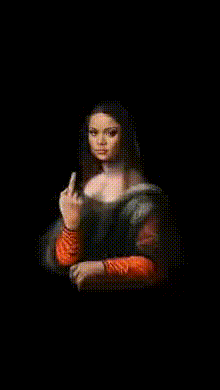
Unleash your creativity with the "Mona Lisa Giving The Finger" template in our Video Face Swap tool. This innovative template takes Leonardo da Vinci's classic and adds a rebellious twist, transforming the enigmatic smile of Mona Lisa into a cheeky, modern gesture. A perfect blend of art and humor, this template is designed for those who enjoy pushing boundaries with their creative projects.
What It Does
This template leverages advanced Video Face Swap technology to replace the classic features of the Mona Lisa with expressive movements. Watch as this iconic Renaissance figure subtly shifts her expression to give a playful "finger" gesture. By utilizing AI-driven transformation, this template captures smooth and realistic motion, turning still art into lively video.
Who It's For
This template is tailored for artists, social media influencers, and content creators who seek to infuse their work with humor and modern twists. It's ideal for anyone looking to create engaging content that resonates with audiences through a mix of classic art and contemporary attitudes. Whether it's for a meme video or a unique social media post, this tool offers the creativity you need.
Summary
Incorporate a playful revolutionary spirit into your projects with the "Mona Lisa Giving The Finger" template. This Video Face Swap tool effortlessly integrates the old and the new, providing a fresh take on a timeless masterpiece. Perfect for modernizing presentations, Instagram Reels, or any project where you wish to make a distinct impression.
How to Use the Template
Choose the Template

Customize the Input

Generate the Video

Use Cases
Meme Videos
Social Media Ads
Art-Based Campaigns
Best Practices
Choose High-Resolution Images
Ensure your original video or image is of high resolution to maintain clarity after the swap.Consider Audience Preferences
Tailor the final video to your audience's sense of humor and cultural references for maximum impact.Experiment with Length
Try different video lengths to see which works best for your content platform, from short clips for Reels to longer formats for YouTube.