Overview
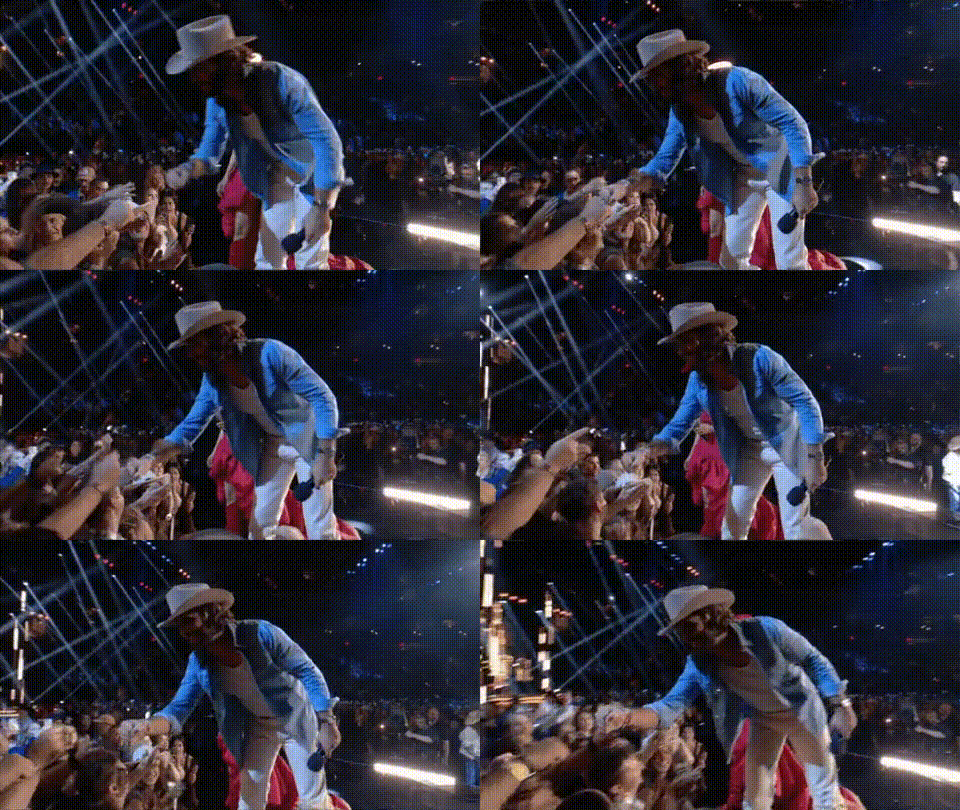
The "Country Singer Fist Bumping Fans" template offers a dynamic way to swap faces into exhilarating concert scenes. Perfect for creating personal mementos or engaging promotional content, this template captures the essence of being up close and personal with a favorite country star. Utilize the excitement and vibrant crowd environment to produce striking video content.
What It Does
This template specializes in Video Face Swap, placing your chosen faces into a scene alongside a country singer amidst cheering fans. Whether it's for branding, fan engagement, or personal enjoyment, this template brings a touch of celebrity experience to your videos. The result is a professional-looking clip where faces are perfectly integrated.
Who It's For
Ideal for fans, marketers, and creators focused on music events, this template is tailor-made for anyone looking to capitalize on the vibrancy of live performances. Whether you're a fan eager to share a unique encounter with your idol, or a brand aiming to create relatable, audience-centered content, this template provides the tools you need.
Summary
Incorporating the excitement of live music events, the "Country Singer Fist Bumping Fans" Video Face Swap template transforms ordinary content into extraordinary, fan-centric video experiences. It promises accurate face placement and high-quality output, making it easy to inspire and engage your audience.
How To
Choose the Face Swap Template

Customize Your Video

Generate Your Final Video

Use Cases
Fan Engagement
- Fan-generated content
- Personalized video messages
Marketing and Promotions
- Social media ads
- Promotional event clips
Event Recaps
- Post-event highlights
- VIP experience simulations
Best Practices
Choose High-Quality Photos
Use images with good resolution and lighting to ensure the face swap effect is natural and convincing.Consider Facial Expressions
Select photos where the facial expressions closely match the action in the video for a more realistic appearance.Experiment with Angles
Test different angles and rotations in your source images to find the best alignment for the swap.