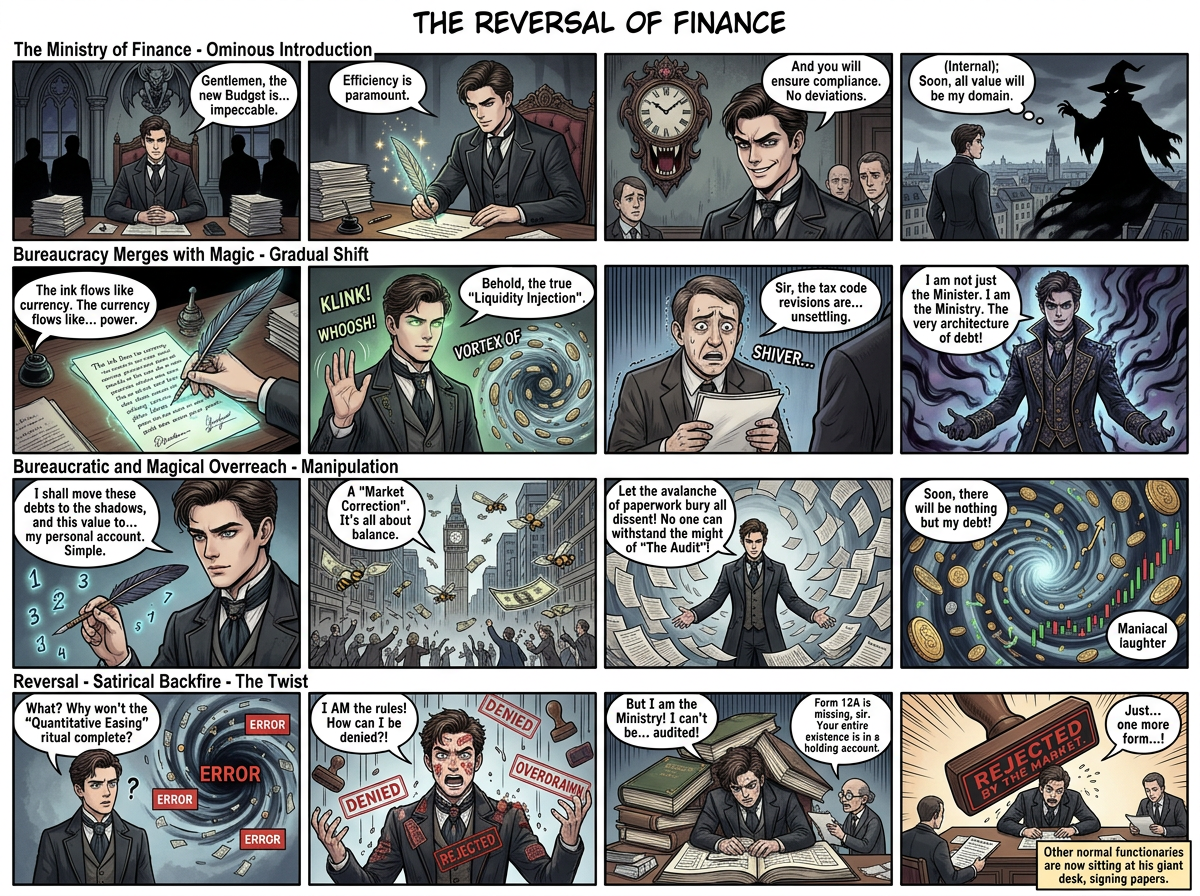
The Reversal of Finance – 16-Frame Comic Grid
ai-image-editor
Any aspect ratio
4×4 grid comic layout (16 frames total), clean structured composition with 4 vertical columns and 4 horizontal rows. Title: “The Reversal of Finance.” Concept: a surreal satirical fusion character (“Kotogemort”) inspired by a sharp-suited bureaucratic figure merged with a dark wizard archetype, symbolizing a fictional “Ministry of Finance.” Each row progresses a narrative arc: Row 1 (Setup): Introduction of the hybrid character in a formal government setting with subtle ominous undertones. Row 2 (Transformation): Gradual visual shift into a darker, more exaggerated magical/bureaucratic form, blending authority with mysticism. Row 3 (Conflict): Chaotic manipulation of documents, currency, or abstract financial forces portrayed as magical energy. Row 4 (Reversal): Ironic twist where power backfires or reality distorts, ending in dark humor or satire. Style: manga/comic-inspired linework, expressive poses, cinematic framing per panel. Include speech bubbles, symbolic props (papers, seals, abstract “finance magic”), and consistent character design across frames. Clean panel spacing, high detail, cohesive storytelling flow.
Transform Product Photos with AI Image Editor (Magic Hour Template)
Use this template to turn ordinary product shots into polished, studio-quality images using the AI Image Editor. It’s designed for founders, marketers, and creators who need fast, consistent, on-brand visuals for landing pages, ads, marketplaces, and socials—without hiring a photographer or designer.
What This Template Is For
This AI Image Editor–based template is ideal if you want to:
- Clean up and enhance product photos for ecommerce (Shopify, Amazon, Etsy, marketplaces)
- Replace cluttered or low‑quality backgrounds with clean, on‑brand scenes
- Create multiple creative variations of the same product (lifestyle, studio, seasonal)
- Localize imagery for different audiences or campaigns
- Prepare assets for social ads, newsletters, pitch decks, and product launches
You can also combine it with other Magic Hour tools to build complete content pipelines—from still images into video, memes, and talking content.
How to Remix This Template in Magic Hour
You can recreate and customize this template directly in Magic Hour by using the AI Image Editor and other compatible tools.
1. Start from Your Base Image
Choose a strong “source” photo of your product:
- High resolution with clear edges
- Neutral or simple background if possible
- Product centered and well lit
Upload it into the AI Image Editor. This will be your master image that you remix into multiple variants.
2. Remove Distractions and Clean Up the Shot
Use AI-powered editing to:
- Remove unwanted objects, logos, or text using the AI Remover or Remove Object from Photo tools
- Clean up messy backgrounds with the Image Background Remover
- Fix blur or low-resolution originals with the AI Image Upscaler or Unblur Image
This gives you a clean, flexible base to apply this template’s look and style.
3. Swap in Professional Backgrounds
Use the AI Image Editor to transform plain or low‑quality backgrounds into:
- Solid colors for marketplace product listings
- Soft gradients for modern SaaS or DTC brands
- Lifestyle environments (desk setups, kitchens, outdoors, etc.)
- On‑theme sets for seasonal campaigns
For more advanced scenes or stylized environments, you can combine this with:
- AI Background Generator for new backdrops
- AI Interior Design Generator for furniture or home products
- Architecture Generator for design or real estate concepts
Once you like a look, reuse it as your “brand background” for all future product shots to keep things visually consistent.
4. Generate Multiple Creative Variants
Remix your base image into a full set of assets:
- Lifestyle vs. studio variants
- Seasonal or event-specific themes
- Different crops for ads, thumbnails, and social feeds
You can also generate matching support visuals with:
- AI Art Generator for campaign graphics
- Book Cover Generator for ebooks or reports
- Thumbnail Maker for YouTube and course content
- Album Cover Generator for music or podcast visuals
Example Use Cases
This AI Image Editor template is particularly useful for:
Ecommerce & DTC brands
Create clean catalog shots plus lifestyle variants for social ads and landing pages. Use AI Clothes Changer or AI Fashion Generator to visualize apparel and styling options on models.Startups & SaaS
Turn product screenshots or hardware photos into marketing visuals that match your brand identity. Use AI Icon Generator and AI Logo Generator for a consistent visual system.Agencies & Creators
Standardize client product imagery while still shipping custom creative per client/vertical. Build templates you can quickly remix for new campaigns and markets.Content & UGC workflows
Clean and reframe user-generated photos so they fit your brand guidelines, then reuse them in ads, landing pages, and email flows.
Turning Edited Images into Video and Motion
Once your product images are polished with this template, you can extend them into motion and video assets:
- Convert stills into short motion clips with Image to Video
- Turn characters or product mascots into animated personas with:
- Build full campaigns using:
- Text to Video for explainer or promo videos
- Video Upscaler to improve quality
- Auto Subtitle Generator for social‑ready clips
For character-driven marketing, consider combining product visuals with face-focused tools like AI Face Editor, AI Headshot Generator, or AI Face Generator.
Building Your Own Reusable Template
To create a reusable template that behaves like this one inside Magic Hour:
Define your “base look”
Decide on background style, product framing, and overall aesthetic (minimal, cinematic, playful, etc.).Create a master image
Use the AI Image Editor to produce a single, clean, on‑brand product shot that you’re happy to replicate.Document your remix pattern
- Where you place the product
- What kind of background you use (color, environment, texture)
- How much empty space you leave for text or UI overlays
- Any additional elements (shadows, reflections, props) generated via AI
Apply it to new products
For each new product:- Upload the raw photo
- Clean background and distractions
- Match framing and styling to the master image
- Generate multiple variants (ads, social, banners) using the same pattern
Extend across formats
Use specialized tools to keep your visual system consistent:- Avatar Generator for team or brand avatars
- AI Meme Generator for lighter social content
- AI QR Code Generator to embed scannable codes into your visuals
This approach lets you treat your Magic Hour workflow as a modular design system you can remix for new campaigns, markets, and products.
Related Magic Hour Templates and Tools
If you like this AI Image Editor template, you may also want to explore:
- Face Swap Video Templates for creator-led or influencer content
- Lip Sync Templates to animate faces to music or voiceovers
- Video-to-Video Templates to stylize product or demo footage
- Animation Templates for explainer content and product storytelling
For image-based creative experiments and campaigns, try:
- AI Photo Generator
- AI Image Generator
- AI Selfie Generator
- AI Anime Generator
- AI Illustration Generator
Why Use Magic Hour for Product Visuals?
Magic Hour combines several capabilities that matter for practical, production-grade workflows:
- High-quality AI image editing via the AI Image Editor
- Specialized tools for background removal, upscaling, and object removal
- The ability to move from static images to full video and animated content
- A library of templates (like this one) you can remix into your own branded systems
Use this template as a starting point, then refine it into your own repeatable workflow for consistent, scalable, AI-powered product imagery across your entire funnel.