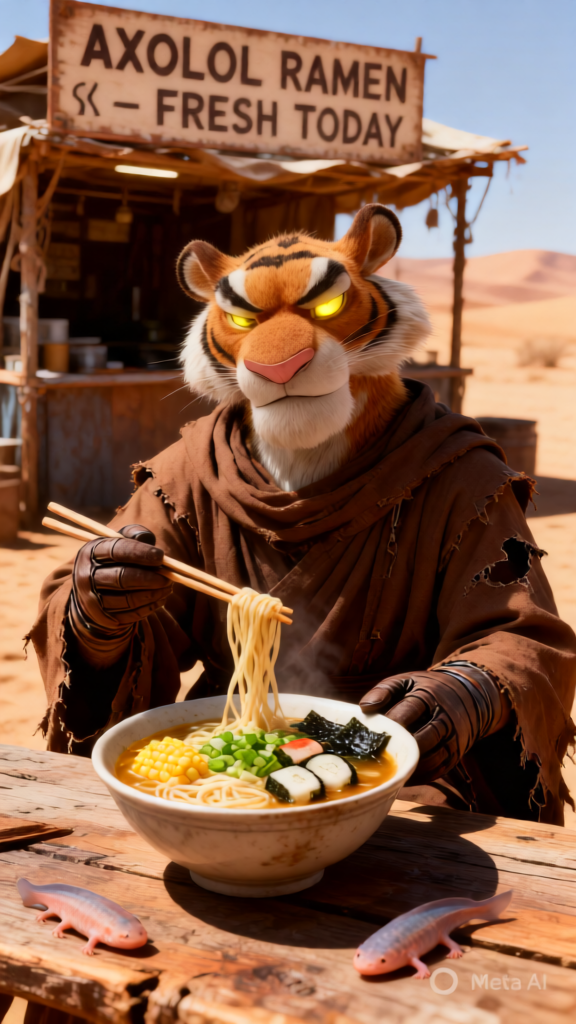
Axolotl Ramen Jawa
ai-image-editor
Any aspect ratio
A photorealistic, highly detailed image of a subject inspired by a Jawa from Star Wars, wearing a tattered brown robe and gloves, with glowing yellow eyes, using chopsticks to eat a bowl of ramen containing noodles, corn, green onions, narutomaki, nori, and two live axolotls. The subject sits at a rough wooden table in a desert setting, with a makeshift stall behind displaying a sign reading “AXOLOTL RAMEN – FRESH TODAY” in Aurebesh and English, under bright sunny lighting that casts strong shadows and creates a warm, earthy palette, blending sci-fi and whimsical tones with rich natural textures and weathered surfaces.
AI Image Editor Template: Advanced Image Editing in Your Browser
Transform any image in seconds with this AI Image Editor–powered template on Magic Hour. Use it as-is, or remix it into your own reusable tool for product shots, social content, marketing experiments, or internal workflows.
This template is built on the AI Image Editor, so you can:
- Edit photos directly in the browser
- Make complex changes with simple text instructions
- Combine multiple AI tools across Magic Hour into one repeatable flow
What This Template Is Great For
Use this template (or your own remix) to:
- Clean up and enhance photos for social media, ads, or landing pages
- Replace or refine backgrounds for product shots or portraits
- Remove unwanted objects, people, or logos
- Adjust faces, expressions, and small details for profile photos and headshots
- Create multiple image variations for A/B tests and creative experiments
If you’re working with product images, brand content, or visual experiments at scale, this gives you a fast, repeatable way to apply consistent edits.
How to Use This Template in Magic Hour
- Open the template in Magic Hour.
- Upload or select an image you want to edit.
- Describe your edit in natural language (e.g., “remove the background and replace it with a studio white backdrop,” “remove the person in the background,” “change the shirt to a black hoodie,” “make it look like a cinematic movie still”).
- Run the template to generate your edited image.
- Export or reuse the output in your design tools, ad platforms, or content pipeline.
Because it uses the AI Image Editor, you can chain multiple edits together inside the same template and run them as a single action.
How to Remix This Template for Your Own Workflow
You can clone/remix this template to build a custom tool tailored to your use case. Typical remix patterns:
Product photo pipeline
- Start from this template
- Add background cleanup using Image Background Remover
- Upscale final images with AI Image Upscaler
- Optionally generate variants with AI Image Generator or AI Photo Generator
Creator / influencer content system
- Use AI Image Editor for quick retouch and background tweaks
- Generate matching video assets with Image-to-Video or Text-to-Video
- Add talking versions of your photos using AI Talking Photo
- Turn clips into GIFs with AI GIF Generator
Professional headshot and profile picture flow
- Start from a casual selfie
- Refine with AI Image Editor (background, lighting, blemish cleanup)
- Generate consistently branded portraits using AI Headshot Generator
- If needed, sharpen legacy photos with Unblur Image or restore older images with Old Photo Restoration
Brand and design teams
- Standardize your brand visuals with AI Image Editor + AI Background Generator for on-brand scenes
- Create graphic variations using AI Art Generator, AI Illustration Generator, or AI Logo Generator
- Produce social thumbnails and covers using Thumbnail Maker, Album Cover Generator, or Book Cover Generator
When you remix, you’re essentially turning this into a mini internal “product” for your team—one click in Magic Hour to apply a consistent series of edits.
Advanced Use Cases for Creators, Marketers, and Builders
If you’re running experiments, shipping campaigns, or building apps on top of Magic Hour, this template is a solid base for:
Ad creative testing
- Quickly generate multiple design and background variants
- Combine AI Image Editor with AI Meme Generator for rapid social experiments
- Create platform-specific crops and visuals, then upscale with AI Image Upscaler
Content & community growth
- Generate reaction images, memes, and avatars via Avatar Generator, AI Face Generator, and refine with AI Image Editor
- Create stylized universes for your brand using AI Anime Generator, Disney AI Generator, AI Manga Generator, and Dark Fantasy AI
Product & game design prototypes
- Use AI Image Editor to tweak concept art, map details, and UI components
- Generate base art via Fantasy Map Generator, Comic Book Generator, AI Character Generator, Animated Characters Generator, and refine with this template
- Create stylized characters with Superhero Generator, Pokemon Generator, or DND AI Art Generator, then polish them in AI Image Editor
Combine This Template with Video and Voice Tools
For richer, multi-modal campaigns or prototypes, connect this image workflow to Magic Hour’s video and voice tools:
- Turn edited images into motion with Image-to-Video or Text-to-Video
- Animate characters or faces using:
- Add dialogue and narration using AI Voice Generator or clone a voice with AI Voice Cloner
- Clean and enhance final video output with Video Upscaler and Auto Subtitle Generator
This lets you go from a static edited image to a fully animated, voiced asset without leaving Magic Hour.
Practical Editing Examples You Can Recreate
You can easily replicate or adapt edits like:
Background cleanup & replacement
- Remove busy or distracting environments
- Replace with studio backdrops, branded gradients, or AI-generated scenes via AI Background Generator
Object and distraction removal
- Erase unwanted items or people with AI Remover or Remove Object from Photo, then refine the rest in AI Image Editor
- Clean watermarks using Watermark Remover
Face and appearance tweaks
- Light-touch edits for professional photos using AI Image Editor and AI Face Editor
- Change gender presentation with Gender Swap
- Experiment with new outfits via AI Clothes Changer or AI Outfit Generator
- Create full-body shots from portraits with Full Body Generator
Stylization and creative filters
- Turn photos into sketches with Photo to Sketch
- Generate graffiti, comic, or illustration styles with Graffiti Generator, Comic Book Generator, and AI Illustration Generator
- Add tattoos or visual motifs via AI Tattoo Generator and refine positioning with AI Image Editor
For Developers and Technical Teams
If you’re building internal tools, SaaS products, or workflows:
- Treat this template as a reference pipeline for AI image editing inside Magic Hour
- Remix it to align with your branding (consistent backgrounds, color palettes, framing)
- Connect it conceptually with:
- AI QR Code Generator for visual CTAs in images
- AI Icon Generator and AI Logo Generator for design systems
- Optical Illusion Generator and AI Art Generator for visually engaging experiments
Many teams use Magic Hour templates as repeatable, low-friction tools that non-technical colleagues can safely run—without touching the underlying model or configuration.
Getting the Most Out of This Template
To get real leverage from this AI Image Editor template:
- Use it as a starting point, not a one-off effect
- Decide on one or two repeatable outcomes you care about (e.g., “all product photos on white,” “consistent LinkedIn headshots,” “brand-compliant social cards”)
- Remix the template so that running it once gives you that outcome every time
- Combine it with other specialized tools (upscaling, background removal, stylization, video, and voice) to build a complete creative pipeline inside Magic Hour
Whenever you find yourself doing the same kind of image edit more than twice, turn this template into your own custom, reusable Magic Hour tool.