Levitation Creative Studio

Levitation Creative Studio

ai-image-editor

1 clip
20 uses

Any aspect ratio

Prompt

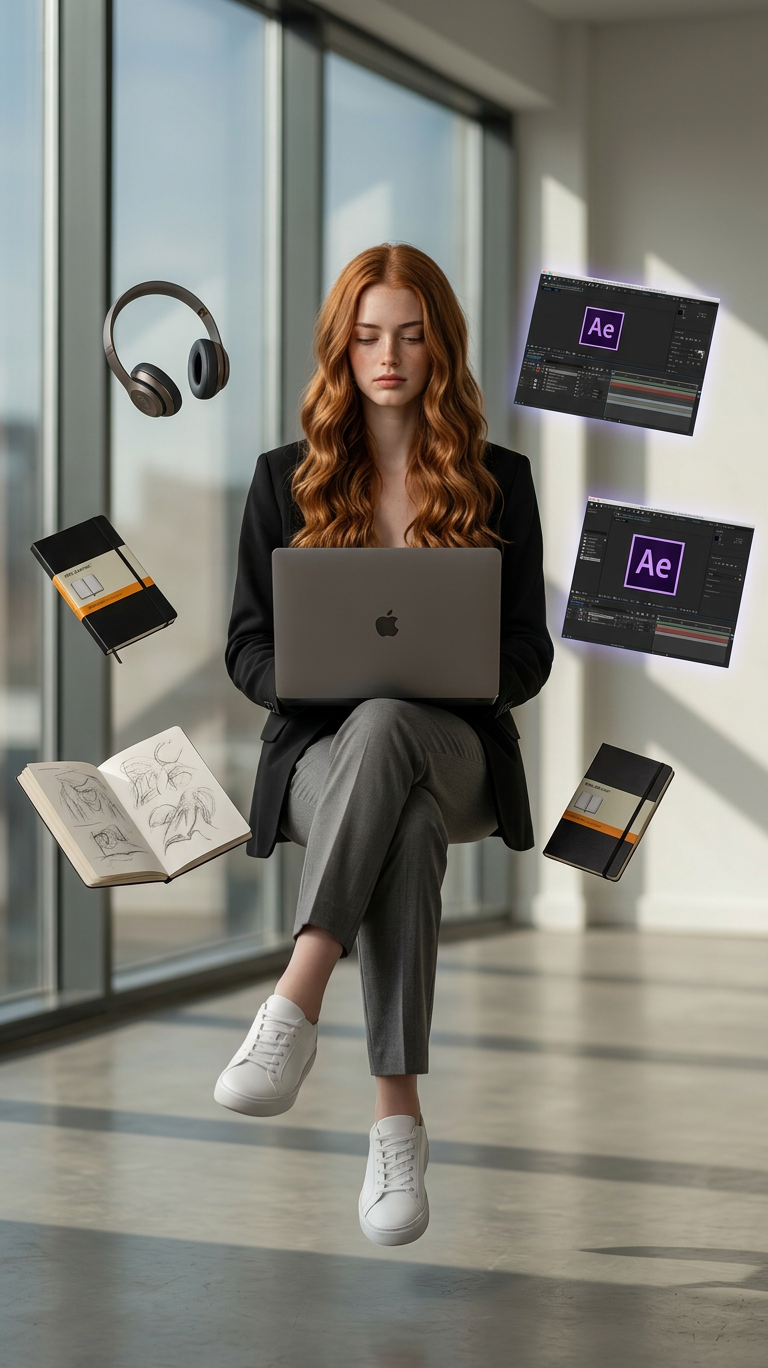
A cinematic levitation portrait of a subject sitting midair while working on a laptop, with the face replaced by the uploaded person’s face while keeping the exact same body pose, outfit, and styling. The subject wears a tailored modern black blazer, grey trousers, and clean white sneakers. Surrounding the subject are symmetrically arranged floating creative tools including over-ear headphones, Moleskine notebooks, open sketchbooks with visible sketches, and glowing professional software interfaces like Adobe After Effects (Ae). Emphasize completely realistic levitation with no visible support and flawless symmetry of objects. The scene is set in a minimal studio room with large floor-to-ceiling windows, soft natural light casting long directional shadows, shallow depth of field with soft bokeh background. Ultra-sharp, hyper-realistic composite photography, high-end digital retouching.

AI Image Editor Template: Fast, Precise Image Editing for Creators

Use this AI Image Editor–based template to transform, clean up, and enhance images in minutes instead of hours. It’s built for creators, marketers, designers, and founders who need production‑ready visuals without a full design team.

This template runs on the AI Image Editor, and you can fully customize or remix it inside Magic Hour to fit your own workflow and brand.


What You Can Do With This Template

This template is designed as a starting point for common, high‑value editing tasks:

Because it’s template‑based, you can reuse the same editing flow across entire campaigns, product lines, or client projects.


Who This Template Is For

This AI Image Editor template is optimized for:

  • Marketers & growth teams
    • Quickly adapt creatives for A/B tests
    • Localize visuals for different regions or audiences
    • Clean up user‑generated content for paid campaigns
  • Ecommerce & product teams
    • Standardize product imagery (consistent backgrounds, lighting, framing)
    • Test different visual angles without reshooting
    • Generate variations for marketplaces, landing pages, and ads
  • Founders & solo creators
    • Produce studio‑quality visuals without design headcount
    • Keep creative control while moving fast on launches and experiments
  • Agencies & studios
    • Build repeatable editing pipelines for client work
    • Standardize how your team edits, retouches, and stylizes images

How to Remix This Template in Magic Hour

You can treat this template as a base “workflow” and adapt it to your own use case. To create your own version of this template inside Magic Hour:

  1. Open the template in Magic Hour

    • Start from this AI Image Editor template in your workspace.
    • Duplicate it so you can modify your own copy without affecting the original.
  2. Swap in your source content

    • Use your own product photos, brand imagery, or portraits.
    • Keep a consistent source style if you’re building a system (e.g., all product shots on neutral backgrounds).
  3. Chain in complementary tools (optional)
    Build more advanced, composable flows by combining the AI Image Editor with other Magic Hour products. For example:

  4. Save your remix as a reusable template

    • Save it once, and your team can re‑run the same workflow across hundreds of images, campaigns, or SKUs.

Because Magic Hour’s tools are modular, you can gradually evolve this starter template into a more sophisticated pipeline as your needs scale.


Popular Use Cases and Recommended Tool Combos

1. High‑Conversion Product Photos

Turn rough product shots into polished ecommerce assets:

For lifestyle variants, you can then animate or extend visuals with Image to Video or AI Gif Generator.


2. Creator & Influencer Content

Clean, restyle, and repurpose photos for multi‑platform content:

You can also diversify content formats by creating memes and social snippets via the AI Meme Generator.


3. Brand & Marketing Design Systems

Standardize your brand imagery across channels:

Then reuse your edited base images across video and audio campaigns using Text to Video, AI Voice Generator, or AI Voice Cloner.


Turn Edited Images Into Video, Animation, and Interactive Media

Once your images are cleaned up and on‑brand with this AI Image Editor template, you can extend them across Magic Hour’s video and animation tools:

  • Face‑driven and character‑driven video

    • Face Swap Video: Drop your edited faces into existing videos
    • Lip Sync: Make edited portraits speak any audio
    • Video to Video: Restyle entire videos to match your edited imagery
    • Animation: Turn still characters into animated sequences
  • Talking photos and dynamic visuals

This lets you maintain visual consistency across static and motion content without redoing base edits.


Advanced Creative and Technical Workflows

For more technical or niche creative use cases, you can build specialized remixes of this template:

Because the AI Image Editor works well as a “first pass” or “last polish,” you can integrate this template at multiple points in your pipeline.


Combining AI Image Editor With Generation Tools

This template is focused on editing, but many teams combine it with generation‑first tools to build full creative systems:

This workflow is particularly effective for teams running rapid‑fire campaigns, experiments, or personalization at scale.


Tips for High‑Quality Results

  • Work from the best source images you have
    Higher resolution and clear subjects give the AI more signal to work with. If you’re stuck with low‑res sources, run them through Unblur Image or AI Image Upscaler before deeper editing.

  • Standardize your inputs for repeatability
    Use the same framing, lighting, and background style when you plan to reapply this template across entire catalogs or campaigns.

  • Think in modular steps
    Break your workflow into logical steps—cleanup, background adjustment, face/outfit tweaks, upscale. This makes it easier to remix and maintain over time.

  • Reuse your best flows as internal standards
    Once you have a version of this template that consistently yields strong results, save it as your team’s default AI Image Editor workflow and share it across projects.


Complementary Tools to Explore

Depending on how you evolve this template, these tools often integrate well into AI Image Editor–centric pipelines:


By starting from this AI Image Editor template and remixing it to match your brand, content strategy, and technical stack, you can turn image editing from a bottleneck into a fast, repeatable part of your creative pipeline—while keeping full control over quality and style.

More Like This

Insufficient credits