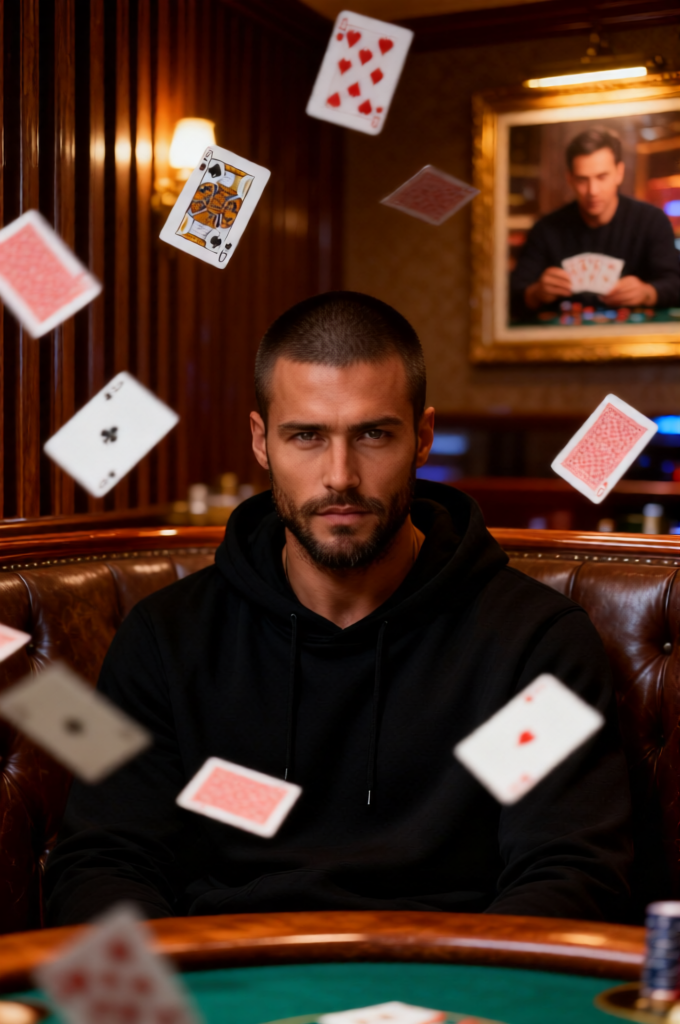
Macau Card Storm
Any aspect ratio
Subject with buzz cut dark hair (face and skin tone preserved exactly with sharp features) wearing a black hoodie, sitting in a rustic booth inside a Macau casino, staring intensely forward. Dozens of playing cards float around him mid-air in dynamic slow motion with subtle motion blur. Background features rich casino interiors with vertical wooden panels, warm lighting, and a framed photo of a man playing cards, blending into a luxurious Macau gambling atmosphere. Cinematic, high detail, moody lighting, shallow depth of field, photorealistic, dramatic and intense vibe.
Overview
Dive into the glamorous and intense world of Macau casinos with the "Macau Card Storm" template. This cinematic template, part of our AI Image Editor, allows you to create photorealistic, atmospheric images that capture the drama and allure of a high-stakes card game. Leveraging the qwen-edit model, this template ensures your subject remains sharp and detailed amidst a dynamic scene.
What It Does
The "Macau Card Storm" template allows builders to create high-quality images that showcase a single subject amidst a swirling mass of playing cards, set within the opulent environment of a Macau casino. By preserving facial features and skin tones, the template ensures that the depiction is both realistic and vibrant, highlighting dramatic motion with a shallow depth of field and moody lighting to enhance the scene's intensity.
Who It's For
This template is ideal for creatives looking to add a touch of drama and intrigue to their visual projects. Whether you're a marketer in need of captivating imagery for advertising campaigns, or a filmmaker seeking detailed storyboards, the "Macau Card Storm" offers powerful tools through our AI Image Editor to elevate visual storytelling.
Summary
The "Macau Card Storm" template delivers a perfect blend of photorealism and cinematic appeal, designed to enhance any project requiring high-impact visuals. Its integration within our AI Image Editor ensures easy adjustments to detail, lighting, and motion effects, making it a versatile choice for projects needing a rich, dramatic vibe.
How-To

Customize

Generate

Use Cases
Casino Promotions
- Eye-catching advertisements
- Social media marketing visuals
Film and Television
- Detailed scene visualization
- Cinematic atmosphere
Interactive Storytelling
- Digital comics or graphic novels
- VR or AR experiences
Best Practices
Maintain Focus
Ensure the subject remains the focal point by adjusting the card placements and lighting to enhance their presence.Optimize Lighting
Utilize the template's moody lighting feature to create contrast and depth, setting the desired tone.Experiment with Details
Modify background elements to match the distinctive architecture of Macau casinos, enhancing authenticity.