Anime Underground Reality Blend
Any aspect ratio
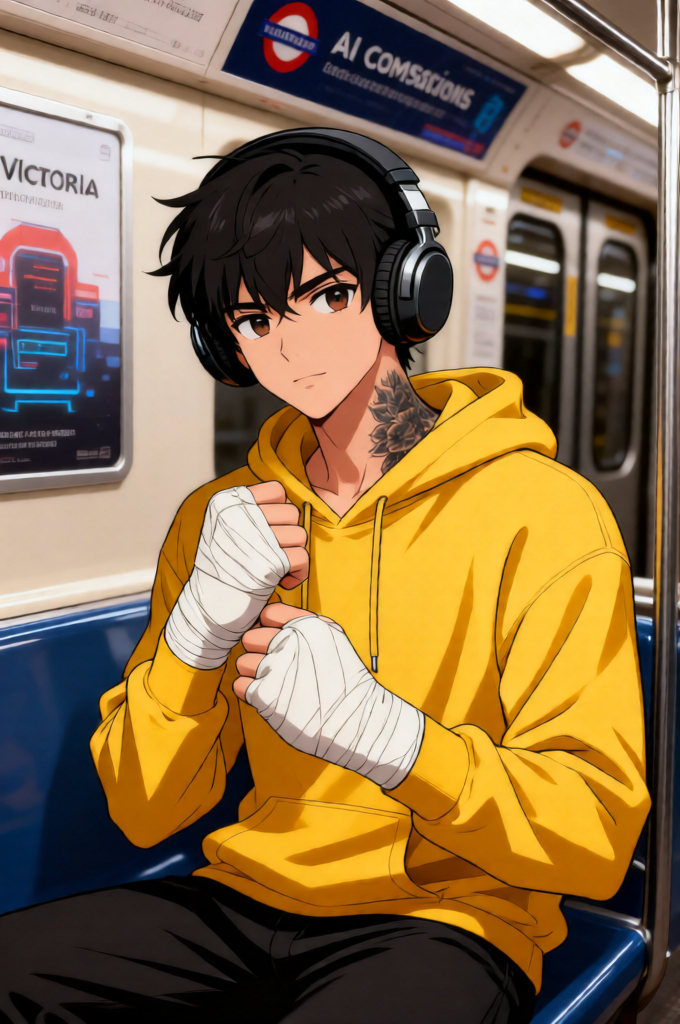
A photorealistic scene blending live action and animation. The subject is an anime-style sitting on a train in the London Underground. The subject wears a yellow hoodie and large wired headphones. The subject is placed in a real-world environment on the Victoria line, with visible ads about AI companions in the background. The anime character contrasts with the realistic surroundings, creating a mixed reality effect. Natural lighting, high detail, cinematic composition, seamless integration between animated subject and real environment.
Overview
The Anime Underground Reality Blend template is designed for creative editors seeking to combine the vivid styles of anime with realistic settings. This unique AI Image Editor template offers users the opportunity to create visually striking images where anime and reality meet seamlessly. Utilizing the qwen-edit model, this template achieves high detail and natural lighting for a compelling mixed reality effect.
What It Does
This template takes inspiration from the bustling London Underground, placing an anime character realistically within this urban environment. The result is a photorealistic composition that juxtaposes animation against real-world backgrounds. Ideal for content that requires cinematic compositions, such as ecommerce ads or social media campaigns, this template makes use of detailed natural lighting and seamless integration techniques to deliver stunning visuals.
Who It's For
The Anime Underground Reality Blend is perfect for artists and videographers looking to innovate in mixed media content creation. It’s also beneficial for marketers developing creative imagery for personalized video ads. Whether you're a newcomer to AI image editing or an experienced professional, this template provides tools needed to explore and create with depth and detail.
Summary
Combine anime artistry with the realism of city life using the Anime Underground Reality Blend. Utilize this template to produce engaging visual content leveraging AI Image Generator technology, effectively bridging the gap between fantastical and realistic visuals. It's a versatile choice for elevating your creative projects.
How to Use
Choose the Template

Customize Your Scene

Generate Your Image

Use Cases
Advertising Campaigns
- Perfect for social media promotions
- Ideal for cutting-edge ecommerce campaigns
Art Installations
- Feature in interactive displays
- Create immersive viewing experiences
Video Production Enhancement
- Suitable for short films and documentaries
- Enrich music video storytelling
Best Practices
Focus on Lighting
Ensure natural lighting settings to maintain the balance between animation and real-world elements for a cohesive effect.Maintain Proportions
Keep character scale consistent with the real-world environment to avoid a jarring look.Experiment with Angles
Try different perspectives to see which offers the most immersive composition for your scene.