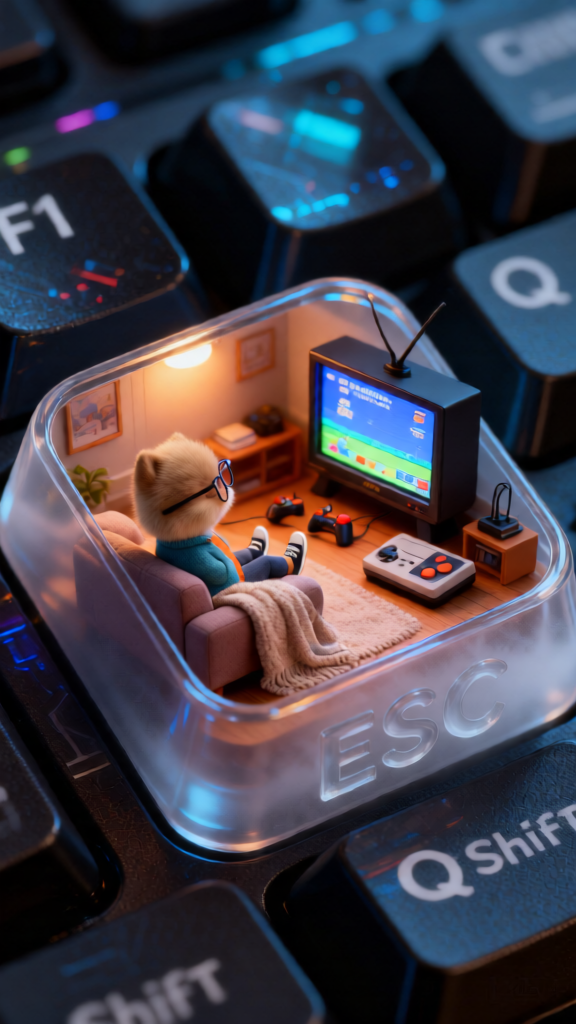
ESC Keycap 90s Lounge
Any aspect ratio
Photorealistic macro of an ESC keycap transformed into a miniature 90s cozy living room. Inside the keycap: a small figure lounges with feet up on a plush couch, watching a glowing nostalgic screen playing a video game, with joysticks, a retro gaming console, and a soft throw blanket. The screen emits warm ambient light like mood lighting. Outside the keycap: cool tech reflections visible on nearby F1, Shift, and Q keys. The word “ESC” appears subtly in glassy fog on the keycap surface. Ultra-detailed, cinematic lighting, sharp focus, macro photography, nostalgic yet modern contrast.
Overview
The ESC Keycap 90s Lounge template harnesses the capabilities of the AI Image Editor to transform a simple ESC keycap into a vibrant scene of 90s nostalgia. This template combines photorealistic macro photography with a touch of nostalgia, creating an ultra-detailed miniature lounge complete with vintage video game atmosphere.
What It Does
This template allows you to convert a keycap into a dynamic 90s-themed scene. Featuring an intricate interior with a plush couch, retro gaming console, and vibrant screen, it provides a lively escape inside the familiar structure of an ESC keycap. The surrounding keys reflect a tech-inspired glow, adding to the overall ambiance. Adjustments can be made using the Full Body Generator for seamless personalization.
Who It's For
Perfect for creators who enjoy combining modern technology with 90s nostalgia. Visual artists, photographers, or anyone interested in macro photography with intricate environments will find this to be an exciting and rich canvas for their creativity. Those creating themed content for social platforms or looking to evoke nostalgic vibes in projects will appreciate this tool's flexibility.
Summary
The ESC Keycap 90s Lounge template is a charming tool within the AI Image Editor, offering users the chance to create highly detailed, nostalgic environments within the confines of a keyboard keycap. With its cinematic lighting and detailed visual elements, it's ideal for creating content that's both engaging and evocative.
How to Use
Select the Template

Customize Your Scene

Generate Your Image

Use Cases
Social Media Content
Themed Marketing Campaigns
Decorative Art Projects
Best Practices
Focus on Detail
Leverage the ultra-detailed setting to highlight intricate aspects of the scene, such as the texture of the couch or the reflection on nearby keys.Play with Lighting
Experiment with the ambient lighting to achieve the perfect mood that complements the nostalgic theme, utilizing cinematic lighting effects.Fine-Tune Reflections
Adjust the reflectivity settings of the surrounding keys to enhance the tech-inspired glow, ensuring consistency with the core scene. Use the Photo Colorizer for vibrant tonal adjustments.