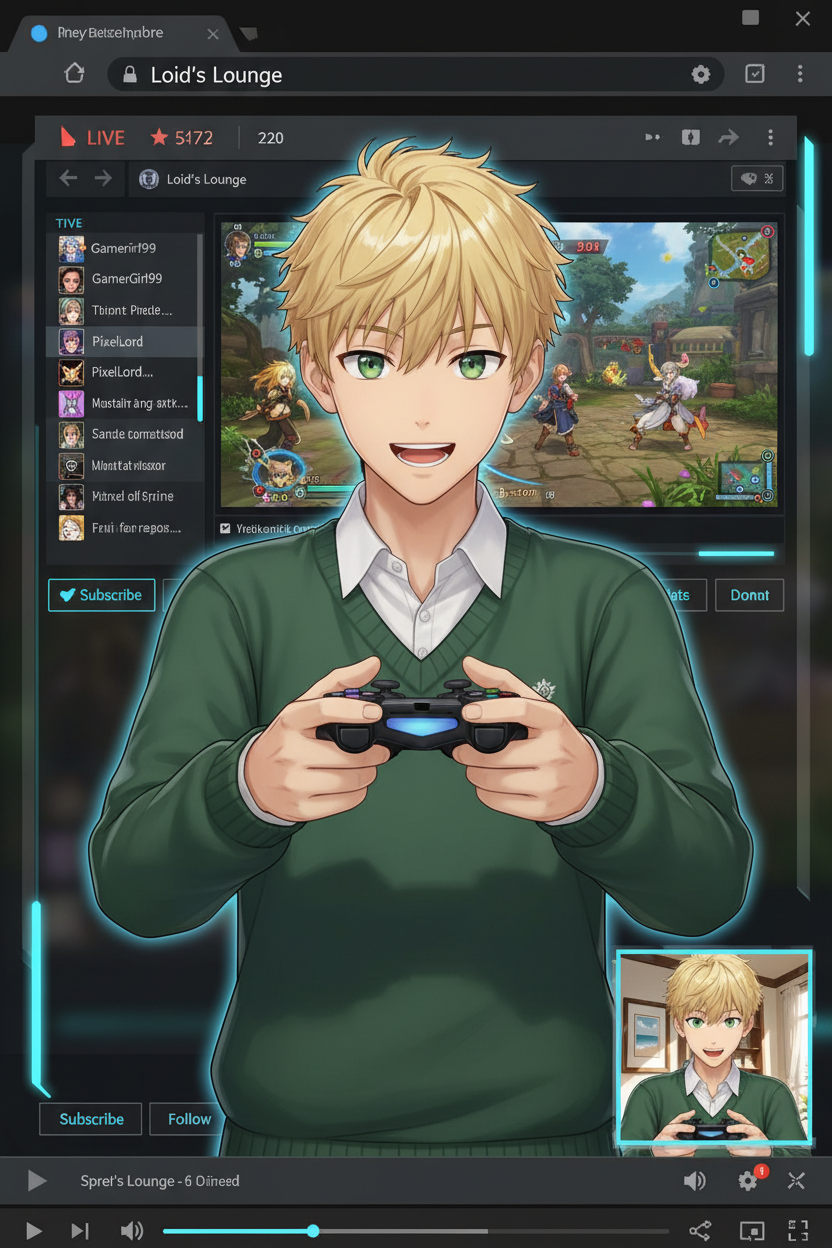
VTuber Stream Overlay Remix
ai-image-editor
Any aspect ratio
Using the original image as reference, recreate the subject as a 2.5D VTuber with the same hairstyle and clothing, adding slight three-dimensional depth. Change expression and pose, and have the VTuber holding a game controller. Compose a streaming layout: large game screen centered, chat panel on the left, and the VTuber’s upper body placed small in the bottom-right corner. Ignore the original background and pose entirely. Add a fictional streaming platform UI with browser bars at the top and bottom. Clean, modern streaming overlay, balanced lighting, high detail.
AI Image Editor Template: Turn Any Photo Into High-Impact Visuals in Minutes
Use this template to rapidly clean up, enhance, and transform images with the AI Image Editor. It’s designed for creators, marketers, founders, and technical teams who want production-quality visuals without a full design stack.
This page explains what the template does, how to remix it in Magic Hour, and how to extend it with other AI tools for end-to-end creative workflows.
What This Template Is For
This AI Image Editor–based template is ideal if you need to:
- Clean up or retouch product photos for landing pages, ads, or marketplaces
- Remove distracting objects or people from photos
- Replace or generate new backgrounds for social, ads, or hero sections
- Convert rough concepts into polished marketing assets
- Standardize visuals across campaigns or product lines
- Quickly test multiple creative directions without a designer
You can use it across:
- Landing pages and paid ads
- App store and product screenshots
- Investor decks and pitch visuals
- Social media and content marketing
- E‑commerce listings and marketplaces
- Prototypes and internal mockups
How to Use and Remix This Template in Magic Hour
You can use this template as-is, or treat it as a starting point and remix it into your own custom workflow inside Magic Hour.
1. Start With the AI Image Editor
Go to the AI Image Editor. Upload the image you want to improve or transform:
- Product shots (for DTC, SaaS UI, marketplaces)
- Portraits and headshots
- Lifestyle or brand photography
- Concept art, UI mockups, or sketches
From there you can:
- Erase & replace elements using object-removal and inpainting
- Edit faces and features using the AI Face Editor
- Generate new backgrounds or scenes with the AI Background Generator
- Fix quality issues using the AI Image Upscaler or Unblur Image
- Remove watermarks or unwanted logos with the Watermark Remover or AI Remover
2. Remix the Template for Your Own Use Case
To create your own version of this template inside Magic Hour:
- Open the existing template and replace the sample image with your own.
- Apply your edits (object removal, background changes, retouching, etc.) using the AI Image Editor.
- Save your edited image and reuse it as a base style for similar assets.
- Duplicate the project and swap in new input images to keep the same “look” and workflow.
Over time you can build your own internal library of “micro-templates”:
- A version for product cards
- A version for founder or team photos
- A version for ad creatives and thumbnails
- A version for deck and investor visuals
You never have to start from zero; you always begin from a previous successful configuration.
Practical Recipes Built on This Template
You can chain this template with other Magic Hour tools to create full creative pipelines.
1. Product Photo → Polished Ad Creative
- Clean up your raw shot with the AI Image Editor.
- Remove distractions with Remove Object from Photo.
- Generate a better backdrop (studio, lifestyle, seasonal) using the AI Background Generator.
- Upscale for ad platforms with the AI Image Upscaler.
- Turn the final still into a short ad loop with Image to Video or AI GIF Generator.
2. Headshot or Portrait → Brand-Ready Profile
- Retouch and clean the base image in the AI Image Editor.
- Fix facial details using the AI Face Editor.
- Swap outfits or styles with the AI Clothes Changer.
- Generate multiple professional variations via the AI Headshot Generator or AI Selfie Generator.
- Standardize backgrounds (e.g., for team pages) with the AI Background Generator.
3. Sketch or Draft → Illustration or Campaign Visual
- Clean or refine your sketch in the AI Image Editor.
- Turn it into a finished illustration with the AI Illustration Generator or AI Art Generator.
- Create comic-style or manga variants with the Comic Book Generator or AI Manga Generator.
- Use the final art in brand assets, then adapt to motion with Image to Video.
Extending This Template Into Video and Animation
Once your images are edited and on-brand, you can push them further:
- Animate characters or avatars from edited portraits using the AI Talking Photo or Animated Characters Generator.
- Turn static scenes into motion with Image to Video or Text to Video.
- Create lip-synced, talking content based on your edited faces using the Lip Sync Template.
- Swap faces in video that match your edited stills with the Face Swap Video Template or Face Swap GIF.
- Transform full clips while preserving motion using the Video-to-Video Template.
- Generate lightweight animated assets (intros, loops, memes) with the AI GIF Generator or Animation Template.
High-Leverage Use Cases for Teams
For Marketers and Growth Teams
- Spin up dozens of creative variations for A/B tests with the AI Image Editor as the base, then adapt to video with Text to Video.
- Generate on-brand thumbnails for YouTube, webinars, and content with the Thumbnail Maker.
- Turn edited visuals into memes or social-native formats using the AI Meme Generator.
For Founders and Startup Builders
- Create pitch visuals and mockups without a designer: combine this template with the AI Photo Generator and AI Icon Generator.
- Generate app or product imagery with the AI Image Generator, then refine it using the AI Image Editor.
- Produce prototype branding assets: logos via the AI Logo Generator, covers via the Book Cover Generator, and album-style layouts with the Album Cover Generator.
For Creators and Designers
- Build stylized avatars with the Avatar Generator, retouch them with this template, and extend into animated characters using the Animated Characters Generator.
- Experiment with stylistic generators like the Disney AI Generator, Dark Fantasy AI, or Graffiti Generator, then refine outputs in the AI Image Editor.
- Create concept art for games/worlds with the Fantasy Map Generator, DND AI Art Generator, or Architecture Generator, then clean and adapt them for production.
Quality, Restoration, and Cleanup
This template pairs well with dedicated enhancement and restoration tools:
- Restore old or damaged images with Old Photo Restoration and Photo Colorizer, then make final adjustments in the AI Image Editor.
- Remove noise and artifacts with Unblur Image, then upscale with the AI Image Upscaler.
- Clean up busy scenes by removing unwanted elements using Remove Object from Photo and the AI Remover.
Branding, Identity, and Experiments
If you’re building or testing a brand system, you can:
- Generate a base visual language with the AI Art Generator and AI Fashion Generator.
- Design avatars, characters, and mascots with the AI Character Generator, Full Body Generator, Superhero Generator, or AI Anime Generator, then refine details with the AI Image Editor.
- Explore more playful experiments like the Gender Swap, Pokemon Generator, Emoji Generator, AI Tattoo Generator, and Optical Illusion Generator, and then adapt the outputs to your visual system.
Audio, Voice, and Multimodal Add‑Ons
For more advanced content workflows, you can connect your edited visuals to audio:
- Generate narrative or VO tracks using the AI Voice Generator.
- Clone brand or founder voices with the AI Voice Cloner.
- Modify voices for character content using the AI Voice Changer.
- Combine edited faces with synced speech using AI Talking Photo and the Lip Sync Template.
- Auto-generate captions and make assets social-ready with the Auto Subtitle Generator.
Tips for Getting the Most Out of This Template
- Standardize early: Decide on a consistent background, lighting, and framing style, then use this template to enforce it across all assets.
- Work from highest quality sources: Better inputs produce better edits. Use AI Image Upscaler and Unblur Image when needed.
- Think in “systems,” not single images: Design a repeatable workflow once (edit, remove, replace, upscale), then remix it across campaigns and clients.
- Chain tools intentionally: The most powerful use cases combine this template with other tools (e.g., edit → upscale → turn into talking head or short video).
Related Magic Hour Tools Worth Exploring
If you’re building a full creative stack around this template, the most relevant tools to explore next are:
- AI Image Editor – core editing, cleanup, and transformation
- AI Image Generator – create new base images to edit
- AI Photo Generator – photorealistic scenes and concepts
- Image to Video and Text to Video – motion and story from your edited stills
- AI Background Generator – fast on-brand backgrounds for this template
- AI Image Upscaler – export-ready resolution for web and print
- Video Upscaler – if you move from images into higher-res video outputs
- Image Background Remover – quick isolation of subjects before editing
Use this template as your foundation, then keep remixing it with other Magic Hour tools until you have a repeatable, end-to-end creative workflow that matches your brand and production needs.