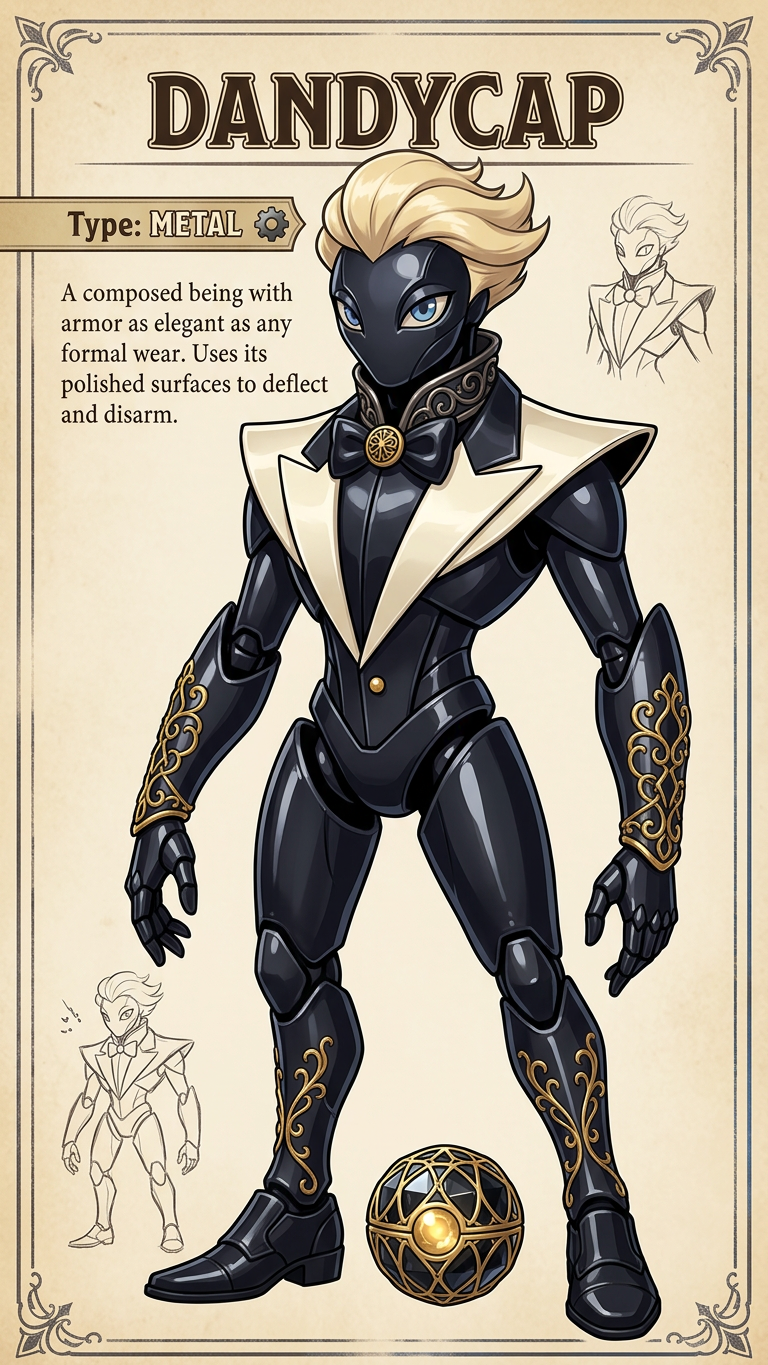
Original Monster Companion

Original Monster Companion

ai-image-editor

1 clip
5 uses

Any aspect ratio

Prompt

Create an original fantasy monster inspired by the provided image. Design a full-body creature that reflects the object’s shape, material, or function, in a cute or cool retro Japanese RPG style. Use clean linework, bold yet harmonious colors, and soft shading for a polished encyclopedia look. Include a small custom orb/capsule at its feet, designed to match the creature’s theme and color palette (not a standard Pokéball). Add an invented creature name displayed clearly near the character, along with its elemental type (e.g., Fire, Water, Metal, Nature, Electric) based on the object’s core traits. Ensure the design feels expressive, cohesive, and believable within a monster-catching fantasy universe.

Tags

transformations

AI Image Editor Template: Turn Any Photo Into High-Impact Visuals in Minutes

Use this AI Image Editor template to transform, clean up, and repurpose your images for social posts, ads, thumbnails, pitch decks, and product shots—without needing design or Photoshop skills. Built on Magic Hour’s AI Image Editor, this template gives you a fast, repeatable workflow for professional-grade edits you can easily remix for your own projects.


What You Can Do With This Template

This template is optimized for:

  • Marketing & growth

    • Create multiple ad variations from a single product photo
    • Localize visuals for different markets (backgrounds, styles, environments)
    • Generate A/B test creatives quickly for paid campaigns
  • Founders & product teams

    • Turn rough screenshots into polished app visuals
    • Prototype brand directions by restyling the same core image
    • Quickly mock landing page hero images for experiments
  • Creators & content teams


How This Template Works

This template is built on Magic Hour’s AI Image Editor, which lets you:

  • Edit directly on your existing photos – rather than generating from scratch
  • Replace or refine specific areas – remove objects, add elements, or change backgrounds
  • Preserve subject identity and structure – great for people, products, and UI screenshots

Under the hood, AI image editing typically combines:

  • Image-to-image diffusion models – to restyle or enhance while keeping composition
  • Inpainting / outpainting – to modify selected regions or extend the canvas
  • Segmentation & masking – to isolate faces, bodies, products, or backgrounds

This gives you more control and reliability than pure text-to-image prompts, especially when you already have a base photo.


How To Remix This Template in Magic Hour

You can create your own version of this template in a few minutes. Here’s a practical workflow that works well for teams and solo creators:

1. Start from the Template

  • Open this template in Magic Hour and duplicate it into your workspace.
  • Keep it as your “base editing pipeline” you can reuse for future assets.

2. Swap In Your Own Source Image

Use high-quality source images for best results:

  • Clear subject, minimal motion blur
  • Good lighting and contrast
  • Enough resolution—if not, upscale first with AI Image Upscaler

Upload your:

  • Product photo
  • Portrait / selfie
  • App/dashboard screenshot
  • Brand illustration or logo lockup

3. Define the Edit You Want

Typical high-value edits you can reuse across campaigns:

4. Save Your “Recipe” as a Reusable Template

Once you have an edit flow you like:

  • Duplicate it as a new template for each use case (ads, thumbnails, profile pics, app screenshots).
  • Keep naming consistent (e.g., Ad Creative – Product Only, YouTube Thumbnail – Portrait + Bold Title) so your team can quickly find and reuse them.

This makes it easy to standardize creative production and maintain brand consistency, especially for growth teams and agencies.


Extend This Template Into Video & Motion

Once you’ve edited your core image, you can use Magic Hour’s video tools to turn static visuals into dynamic content.

  • Animate your edited image into video

  • Turn photos into talking characters

  • Create advanced video content using video-first templates

    • Face Swap Video – apply your edited face or headshot to existing video.
    • Lip Sync – sync mouth movement to your audio or generated voice.
    • Video to Video – restyle entire videos based on your edited visual identity.
    • Animation – animate your brand characters or edited images into stylized motion.

Use Cases and Playbooks

1. Performance Marketing & Growth

  • Start with a single high-quality product or lifestyle photo.
  • Use the AI Image Editor template to create multiple variants (studio, lifestyle, seasonal, regional).
  • Test different concepts and messaging by pairing your creatives with:
  • Turn your best-performing static creatives into motion with Text to Video or Image to Video.

2. Founders, Product & SaaS Teams

  • Clean and restyle product screenshots with the AI Image Editor.
  • Generate consistent UI visuals for:
    • Pitch decks and investor updates
    • Landing pages and onboarding flows
    • App store listings and feature highlights
  • Enhance clarity with Photo to Sketch for diagram-style visuals.
  • Use AI Logo Generator and AI Icon Generator to expand brand assets quickly.

3. Creators, Educators & Content Teams


Design Specialized Visuals From This Base Template

Once you’re comfortable with the AI Image Editor template, you can branch into more specialized tools while keeping your brand and subject consistent:

Because all of these can be driven from your edited base image, you maintain visual continuity while exploring many creative directions.


Best Practices for Reliable AI Image Editing

To get production-quality results with this template:

  • Start from the highest-quality image you have

  • Work non-destructively

    • Always duplicate the template before major changes.
    • Save “milestone” versions (e.g., v1 – Clean Background, v2 – Brand Colors, v3 – Social Crop).
  • Think in terms of reusable systems, not one-off edits

    • If you find a combination of edits that works, turn it into its own template.
    • Share naming conventions with your team to keep things discoverable.
  • Combine tools intentionally


Where This Template Fits in a Larger AI Workflow

Many teams now run an end-to-end AI-first creative pipeline. This template typically sits in the middle of that pipeline:

  1. Concept & generation

  2. Selection & editing (this template)

    • Bring your chosen image into the AI Image Editor template.
    • Clean, refine, and align to brand.
  3. Extension & reuse

By anchoring your workflow around this AI Image Editor template, you get a consistent, repeatable way to turn raw ideas and rough photos into production-ready assets that can scale across channels.


Use this template as your starting point, then duplicate and adapt it to match your specific brand, product, and channels. Over time, you’ll build your own internal library of AI-powered image editing blueprints tailored to your team’s needs.

More Like This

Insufficient credits