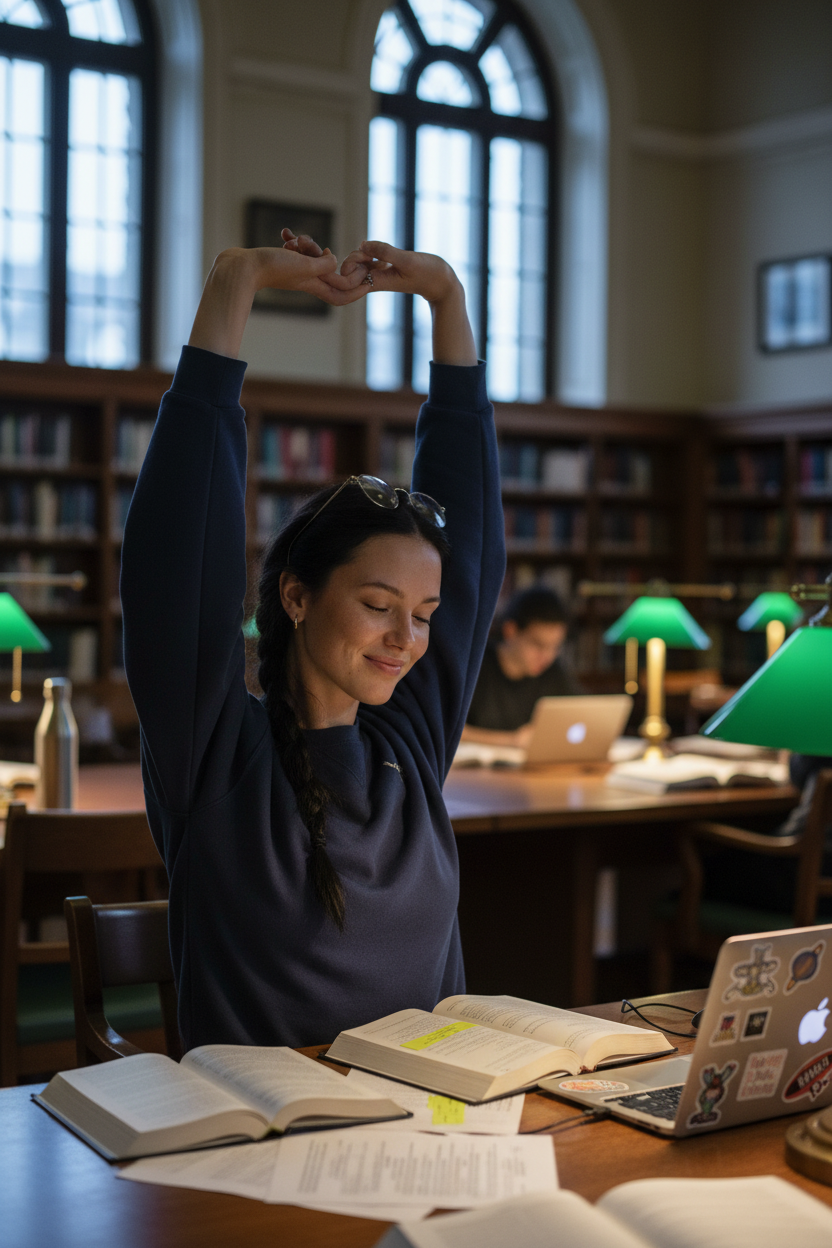
Librabry Study Break

Librabry Study Break

ai-image-editor

1 clip
0 uses

Any aspect ratio

Prompt

Subject stretching arms above head during a study break in a university library reading room, wearing a slouchy navy blue crewneck sweatshirt with sleeves pushed up, simple gold stud earrings, and thin wire-frame glasses resting on the forehead. Black hair styled in a loose, slightly messy French braid. Desk scattered with open textbooks, highlighted pages, a laptop with stickers, and a reusable water bottle. Library setting with tall arched windows, diffused grey afternoon light, dark wooden bookshelves, and green-shaded reading lamps casting warm light on polished tables, with other students softly blurred in the background. Captured mid-stretch with eyes closed and a small relieved smile, relaxed shoulders, candid natural moment, cinematic contrast between cool daylight and warm interior lighting.

AI Image Editor Template: Turn Any Idea into Production‑Ready Visuals

This template is built on Magic Hour’s AI Image Editor, designed for creators and teams who need fast, precise visual changes without opening Photoshop or briefing a designer. Use it to edit product shots, marketing assets, social posts, concept art, and more—directly in the browser.


What you can do with this template

Use this template as a starting point for:

  • Product & ecommerce imagery

    • Change backgrounds and environments
    • Swap colors, textures, or materials
    • Add or remove props and elements
    • Clean up distractions and imperfections
  • Marketing & growth content

    • Localize campaigns with region‑specific visuals
    • Generate A/B test variants for ads and landing pages
    • Create social and blog illustrations in a consistent style
  • Brand & creative development

    • Iterate on visual identity ideas (typography, color, layout)
    • Mock up campaign concepts before full production
    • Turn rough sketches into polished visuals
  • Content & media workflows

    • Quickly adapt visuals for email, decks, and case studies
    • Repurpose a single hero image into multiple formats
    • Maintain visual consistency across channels

Under the hood, the AI Image Editor uses diffusion-based models and prompt‑guided inpainting/outpainting to edit specific regions while preserving the rest of your image, similar to research popularized in tools like Stable Diffusion and Adobe’s generative fill.


How to remix this template in Magic Hour

You can create your own version of this template in a few minutes:

  1. Open AI Image Editor
    Go to the AI Image Editor.

  2. Upload or select a base image

    • Use existing product photos, portraits, app screenshots, illustrations, or reference art.
    • For entirely new scenes, first generate one using the AI Image Generator or AI Photo Generator, then bring it into the editor.
  3. Define what you want to change
    Think in terms of:

    • Subject changes (e.g., “replace mug with a glass bottle”)
    • Style changes (e.g., “minimalist, studio-lit, soft shadows”)
    • Background changes (e.g., “cozy living room, natural light”)
    • Cleanup (e.g., “remove logo”, “remove person in background”)
  4. Use targeted edits instead of full‑image overhauls

  5. Iterate quickly

    • Try multiple creative directions by remixing the same base image.
    • Save promising variations and compare side by side.
    • For higher resolution output, run your final choice through the AI Image Upscaler.
  6. Turn stills into motion (optional)
    Once you like the edited image, you can:

Saving this workflow as your own template in Magic Hour makes it easy to rerun similar edits for future campaigns, product launches, or content drops.


Suggested use cases & example workflows

For practical, repeatable workflows, pair this template with other Magic Hour tools:

1. Product launches & ecommerce

2. Performance marketing & growth

  • Create ad concepts from a single shoot by remixing angles, backgrounds, and props
  • Generate ad‑specific variants:
    • Social feed versions with bold compositions
    • Story/vertical versions optimized for mobile
  • Test different visual angles alongside AI‑generated copy and headlines
  • Convert top‑performing creatives into animated versions using Video to Video templates or Lip Sync templates

3. Brand, content, and storytelling

4. Creators, influencers, and personal brands


How to adapt this template to your team’s workflow

You can easily “fork” this template and tailor it for:

  • Brand kits

    • Lock in preferred color palettes, environments, and lighting styles
    • Create internal reference examples so your team knows what “on-brand” looks like
  • Design systems

  • Content pipelines

By saving your favorite prompts, base images, and edit types, this template becomes a reusable editing “recipe” your whole team can follow.


Best practices for high‑quality AI edits

Based on common patterns used by advanced teams:

  • Start with strong input
    Well‑lit, high‑resolution images produce more reliable, realistic edits. If needed, sharpen them first with Unblur Image or restore older assets with Old Photo Restoration.

  • Be explicit in your instructions
    Describe:

    • What to change
    • What to preserve
    • The target style (e.g., “natural light, shallow depth of field, editorial style”)
  • Control for consistency
    When creating series (e.g., a campaign set):

    • Reuse base images or compositions
    • Keep style descriptors consistent across edits
  • Use specialized tools when needed
    For more specific tasks, combine this template with:


Example “remix recipes” you can build from this template

You can adapt this template into reusable internal recipes. For example:

  • Product hero remixer

    • Start with your core product photo
    • Use AI Image Editor to:
      • Generate multiple branded backgrounds
      • Add seasonal or campaign‑specific elements
    • Upscale final images with AI Image Upscaler
  • Thought‑leadership image generator

  • Book / course promo visuals

Each of these can be cloned and adjusted for new campaigns without rebuilding from scratch.


Where to go next

Remix this template, document your own internal prompts and examples, and turn AI‑assisted image editing into a predictable part of your production stack.

More Like This