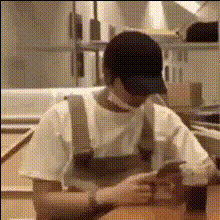
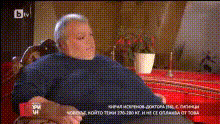
Man sitting on a chair inside a train
text-to-video
Any aspect ratio
man sitting on a chair inside a train, camera slowly zooming into his face
Tags
popularCreate AI Videos from Text with Magic Hour Text-to-Video
Turn any written idea into a production-ready video directly from a text prompt. This template is a working example of what you can build with Magic Hour’s Text-to-Video engine—and a fast starting point you can remix into your own reusable template for campaigns, product launches, explainers, or prototypes.
What this Text-to-Video template does
This template shows how you can use Magic Hour to:
- Generate a complete video from a short text description
- Control subject, style, and motion using prompt techniques
- Create short, loopable clips for social media, ads, or product demos
- Quickly iterate by remixing and refining your prompt
Under the hood, Magic Hour uses modern text-to-video models (in the same class as systems described in research on OpenAI’s Sora, Google’s Lumiere, and Runway Gen‑2) to synthesize temporally coherent, high-fidelity video from natural language. You focus on the idea; the model handles motion, lighting, and camera behavior.
If you’re familiar with AI image generation, this is the same paradigm applied to moving images: instead of storyboards, stock footage, and manual editing, you get a draft video directly from your written specification.
How to remix this template inside Magic Hour
You can create your own version of this template in a few minutes and turn it into a repeatable building block in your workflow.
-
Open Text-to-Video
Go to the Text-to-Video product page to start a new generation. -
Use this template as a conceptual starting point
- Describe the scene: environment, subject, and what is happening (e.g., “founder presenting in a modern office,” “robot assembling a circuit board,” “3D abstract shapes rotating”).
- Specify a visual language: “cinematic,” “product demo style,” “minimal tech aesthetic,” “anime,” or “high-end 3D render.”
- Add camera feel: “smooth cinematic dolly shot,” “handheld vlog style,” “slow drone flythrough,” or “static camera with subtle parallax.”
- Indicate mood: “optimistic and bright,” “serious and analytical,” “playful and colorful.”
-
Iterate like you would with an AI image model
- Remix the prompt: change time of day, angle, pacing, or style (e.g., “same scene at night with neon lights,” “same action but in flat illustration style”).
- Generate several runs, then keep the versions that best fit your brand or narrative.
- Copy the prompt that works and treat it as your own “internal template” for future videos—tweak only the details (product name, feature, scene) per project.
-
Build a multi-step workflow with other Magic Hour tools
- Pre-visualize stills using the AI Image Generator or AI Photo Generator, then base your text prompt on those reference images.
- Polish input assets with AI Image Editor or AI Image Upscaler if you’re including brand elements, logos, or product shots.
- Sharpen final video quality using the Video Upscaler for higher-resolution outputs.
- Add captions and make content accessible with the Auto Subtitle Generator.
Because Magic Hour lets you combine multiple products in a single pipeline, you can treat this Text-to-Video template as one modular step in a larger content system for your team.
Who this template is designed for
This Text-to-Video template is optimized for people who need to ship assets quickly and iterate often:
- Marketers & growth teams
Validate concepts before full production: generate ad mockups, hero background loops, and social variants to test messaging and creative direction. - Startup founders & product teams
Turn product specs into visual narratives: show user journeys, onboarding flows, or “future vision” concepts in pitch decks and landing pages without a video crew. - Content creators & YouTubers
Fill gaps in your content calendar with B‑roll, abstract visuals, intros, and transitions created straight from text, especially for explainer or commentary formats. - Developers, data, and technical teams
Communicate complex systems or architectures with animated sequences that are easier to understand than static diagrams or slide decks.
Prompt patterns that produce better AI video
Teams that get consistently good results with text-to-video tend to use structured prompts rather than one-line descriptions. When remixing this template, consider specifying:
-
1. Subject & action
- “A close-up shot of a developer typing on a laptop in a modern co-working space, focused on the hands and keyboard.”
- “A drone-style flyover of a futuristic city at night with traffic lights streaking below.”
- “A person unboxing a sleek hardware device on a clean, minimalist desk.”
-
2. Visual style & medium
- “Cinematic, shallow depth of field, soft key light, realistic skin tones.”
- “2D anime style, high contrast, bold line art, saturated colors.”
- “3D render, Pixar-like, soft lighting, smooth materials.”
- “Flat illustration, minimal shapes, muted tech color palette.”
-
3. Camera & motion cues
- “Slow tracking shot from left to right, steady camera.”
- “Handheld camera, subtle micro-shakes, natural movement.”
- “Static camera with objects moving through the frame, loopable motion.”
-
4. Mood & atmosphere
- “Optimistic, bright, startup aesthetic, natural daylight.”
- “Dark, cyberpunk, neon reflections on wet streets, moody atmosphere.”
- “Calm, focused, clean workspace, soft neutral colors.”
-
5. Context & intended use
- “Loopable 5–10 second clip for a hero section background on a SaaS landing page.”
- “Short teaser for a new feature launch on social media.”
- “Visual B‑roll for a YouTube explainer about AI tools for marketers.”
Structuring prompts this way aligns with patterns highlighted in public AI prompting guides and research: more explicit instructions about subject, style, motion, and context typically yield more controllable, repeatable results.
Combine Text-to-Video with complementary Magic Hour products
For more advanced or personalized remixes of this template, you can chain Text-to-Video with other Magic Hour tools:
-
Turn photos or key frames into animated scenes
- Start with a single strong image and animate it using Image-to-Video.
- Clean up or edit faces, backgrounds, or lighting beforehand using the AI Image Editor or AI Face Editor.
-
Create and animate characters or mascots
- Design your brand mascot or narrative characters with the AI Character Generator or Animated Characters Generator.
- Use Text-to-Video to place those character concepts into environments—product walkthroughs, stories, or onboarding sequences.
-
Add faces, lip sync, or talking photos
- Swap in specific faces for actors or characters using the Face Swap Video template or the Face Swap product.
- Make static images speak with AI Talking Photo, then generate narration via AI Voice Generator or AI Voice Cloner.
- For music-driven or meme-style content, combine with the Lip Sync template.
-
Restyle or transform existing footage
- Use the Video-to-Video template to turn existing clips into new aesthetics (e.g., anime, comic-book, cinematic, stylized illustration).
- Draw inspiration from tools like Dark Fantasy AI, AI Anime Generator, Comic Book Generator, or Disney AI Generator when describing style in your prompts.
-
Generate supporting assets around your video
- Create YouTube, product, or campaign thumbnails with the Thumbnail Maker.
- Keep visual identity consistent with matching Album Covers, Book Covers, and Logos.
- Produce additional visuals—AI Memes, Avatars, or scannable AI QR Codes—to tie into your campaign or funnel.
- Convert short sequences into GIF format using the AI GIF Generator for email, chat, and social embeds.
Example remix ideas you can build from this template
Use these as patterns you can adapt to your own product, brand, or story.
-
Product explainer or feature shot
- Prompt pattern: “Cinematic close-up of a person using a modern SaaS dashboard on a laptop in a bright office, soft natural light, startup aesthetic, smooth camera pan across the screen.”
- Then: Overlay UI callouts, annotations, or text in your usual editing stack, and add narration using AI Voice Generator.
-
Hero background for a landing page
- Prompt pattern: “Abstract 3D shapes gently rotating in a gradient environment, soft reflections, smooth slow motion, loopable, modern tech brand colors, minimal and clean.”
- Then: Export a short loop and use it as a video background in your hero section, with your headline and CTA overlaid in your site builder.
-
Social teaser for a new feature or launch
- Prompt pattern: “Dynamic montage of icons and UI elements assembling into a single interface, high-energy transitions, bold colors, tech product launch style.”
- Then: Add a short script with AI Voice Generator, generate subtitles via Auto Subtitle Generator, and export vertical versions for Reels, Shorts, and TikTok.
-
Stylized brand narrative or vision sequence
- Prompt pattern: “A futuristic city at dawn, drone-style flythrough, neon accents, hopeful and optimistic tone, cinematic, volumetric lighting, 4K aesthetic.”
- Then: Use this as an opening or transition shot in a brand film, product vision video, or investor deck opener.
You can remix each of these by swapping in your product domain (fintech, health, devtools), changing style (anime vs. photoreal), or adapting the mood (playful, corporate, minimalist).
Why teams use Magic Hour for Text-to-Video
For time-constrained creators, marketers, and builders, the value of this template and the underlying engine is in compressing the path from idea to usable asset:
- Fast path from concept to output
Go from written idea to testable video in minutes—useful for early-stage creative exploration, A/B tests, and internal alignment. - Control via natural language
Instead of managing timelines, keyframes, and layers, you iterate with text. This lowers the barrier for non-video specialists while still allowing fine-grained control via detailed prompts. - Ecosystem of connected tools
Chain Text-to-Video with Image-to-Video, the Face Swap Video template, Video Upscaler, or the AI GIF Generator to cover the full lifecycle from storyboard and character design to export and distribution. - Scalable for campaigns and experimentation
Generate multiple variations for different audiences, languages, and channels without linear production overhead. Use consistent prompt structures, swap only the variables (hook, feature, brand angle), and standardize your team’s internal “prompt library.”
Getting started: turn this into your own reusable template
To build your own version of this Text-to-Video template and adapt it to your brand:
- Open Text-to-Video.
- Write a detailed prompt that explicitly covers subject, style, motion, mood, and use case.
- Generate several variations; keep the ones that best match your brand and discard the rest.
- Save the winning prompt as your internal template—reuse it and only adjust product details, messaging, or scene specifics per project.
- Extend with additional tools such as Video-to-Video, Face Swap Video, Lip Sync, or Animation whenever you need further control, stylization, or character-driven content.
Use this page as a reference, then remix aggressively: evolve the prompt language, story structure, and visual style until the output feels native to your product and consistent with the rest of your brand system.