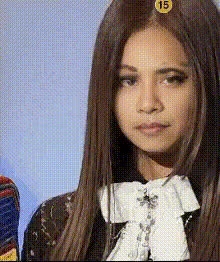
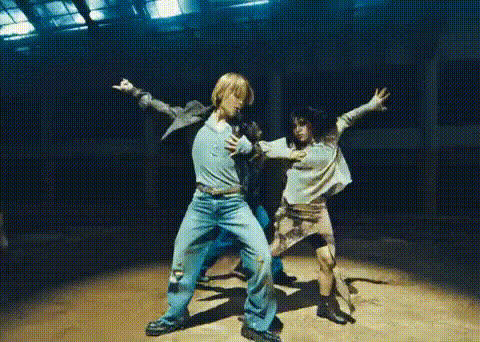
Jennie Mantra MV Rehearsal Intro

face-swap

1 clip
10 uses

Any aspect ratio

Jennie “Mantra” MV Rehearsal Intro – Face Swap Video Template

Overview

This Jennie “Mantra” MV Rehearsal Intro template lets you drop yourself directly into a K‑pop rehearsal-style opening using AI face swap. Built on Magic Hour’s Face Swap Video workflow, it replaces Jennie’s face with yours (or any face you choose) while preserving the original movement, lighting, and camera work.

The result: a clean rehearsal intro that looks like a real dance practice clip, ready for YouTube, TikTok, Shorts, or Reels — without any manual masking, motion tracking, or video editing.

What This Template Does

  • AI Face Swap on MV Rehearsal Footage
    Automatically swaps Jennie’s face in the rehearsal intro with:
    • Your own selfie or portrait
    • A stylized face generated with AI Face Editor or Avatar Generator
    • Brand mascots, campaign characters, or creator “alts”
    Facial expressions, head motion, and perspective are preserved so the swap feels anchored and cinematic.
  • Rehearsal-Style Dance Intro
    The template is structured like a real MV practice intro — wide frame, neutral background, clean choreography preview. It’s ideal as:
    • An opener for full dance covers
    • A hook clip for Shorts/Reels to drive people to your full video
    • A quick visual for teasers, promos, or challenge announcements
  • Optimized for Social and Creator Workflows
    Export once and reuse everywhere. This template is easy to pair with:

Why Face Swap for K‑Pop and Dance Content?

AI face swapping has become a common tool in fan edits, concept videos, and creator marketing. Used responsibly, it lets you:

  • Prototype Concepts Fast – Test how a shot, outfit, or lighting setup might look on you before investing in full production.
  • Produce High-Quality Intros Without a Studio – Leverage professionally shot rehearsal-style footage as the base and swap only the face.
  • Create Consistent Visual Identity – Keep the same “face” or character across multiple concepts using AI Face Generator, then swap it into different scenes.

For more advanced pipelines, Face Swap pairs well with:

  • Lip Sync – Turn still photos into talking intros or reactions that match your audio.
  • Video-to-Video – Stylize rehearsal footage (e.g., anime, comic, noir) while keeping the choreography, then apply face swap on top.
  • Text-to-Video – Generate original concept shots from prompts, then swap your face into them for cohesive campaign assets.

Lore & Context: Jennie “Mantra”

Jennie of BLACKPINK released “Mantra” as part of her solo work in 2024 after launching her own label. The song and its choreography quickly became a staple in K‑pop dance communities:

  • The official MV was released in October 2024 and rapidly accumulated tens of millions of views.
  • The choreography mixes sharp isolations with groove-heavy transitions, making it highly replayable for dance covers and tutorials.
  • Rehearsal-style videos (“dance practice” or “MV rehearsal” clips) are widely used by fans and creators as reference material for learning and breaking down choreo.

This template is inspired by that rehearsal format, giving you an MV-style intro you can adapt for:

  • Dance covers and practice logs
  • Creator-brand intros (“channel opening” clips)
  • K‑pop challenge announcements and UGC campaigns

How to Remix This Template in Magic Hour

You can create your own version of this Jennie “Mantra” rehearsal intro in a few steps using Magic Hour’s tools. You don’t need to match every detail — the key idea is: start with a rehearsal-style clip → swap the face → export and reuse.

1. Start from a Face Swap Video Flow

Open the Face Swap Video page. Use:

  • Your own dance footage shot in a rehearsal style (wide frame, minimal background), or
  • Stock / existing footage you have rights to use, with clear views of the dancer’s face.

This will act as your “Jennie-style” base rehearsal clip.

2. Prepare the Face You Want to Swap In

For clean, realistic results:

  • Use a clear, front-facing portrait or selfie with good lighting.
  • If you want a stylized or branded look, create a face first with:

3. Run Face Swap on Your Rehearsal Clip

In the Face Swap Video tool:

  • Upload your rehearsal-style video as the base.
  • Upload your selected face image as the target.
  • Generate the swapped video, then preview to confirm expressions and orientation look natural.

If you’re building content around a character or alter ego, you can keep reusing the same face image across multiple base clips for a consistent persona.

4. Enhance, Stylize, or Extend the Intro

Once you’ve generated your face-swapped intro, you can:

  • Upscale it with Video Upscaler before posting to YouTube or TikTok.
  • Add a stylized MV look by sending your clip through Video-to-Video (e.g., anime, comic, dark fantasy) and then applying face swap again if needed.
  • Turn still images into matching inserts using Image-to-Video, then face-swap those too for cutaway shots.

5. Build a Full Dance or Creator Workflow Around It

To turn the intro into a complete creator system:

Use Cases for Creators, Marketers, and Teams

  • Dance and performance creators
    Create a recognizable intro that instantly signals “K‑pop rehearsal” quality, even if you’re filming in a simple studio or home setup.
  • Agencies and brands
    Prototype K‑pop–inspired campaigns by swapping your talent’s or influencer’s face into rehearsal-style shots. Then iterate quickly on style using Video-to-Video and Text-to-Video.
  • Startups and product launches
    Build a recurring “MV rehearsal” intro format for product announcements, release notes, or community updates — Face Swap lets one performer carry multiple visual identities.

Best Practices & Creative Tips

  • Respect rights and likeness – Only use footage and faces you have rights to use, and always follow platform policies and local regulations on AI, likeness, and deepfakes.
  • Match angles and lighting – Use source face photos with similar angles and lighting to your base video for the most realistic result.
  • Keep the rehearsal framing clean – Simple backgrounds and clear wide shots make face swap more convincing and easier to reuse in edits.
  • Use consistent “character” faces – If you’re building a brand character, generate and save a core face using AI Face Editor or AI Character Generator and reuse it across templates.
  • Package as a template for your team – Once you have a version you like, your team can repeatedly remix it in Face Swap Video just by swapping in new faces and base clips.

Related Magic Hour Tools to Explore

To build a complete Jennie “Mantra”–style content system, explore:

Use this Jennie “Mantra” MV Rehearsal Intro template as a starting point, then remix it with Magic Hour’s Face Swap Video, Video-to-Video, and related tools to build a repeatable, professional intro format for your dance content, campaigns, and creator brand.

More Like This