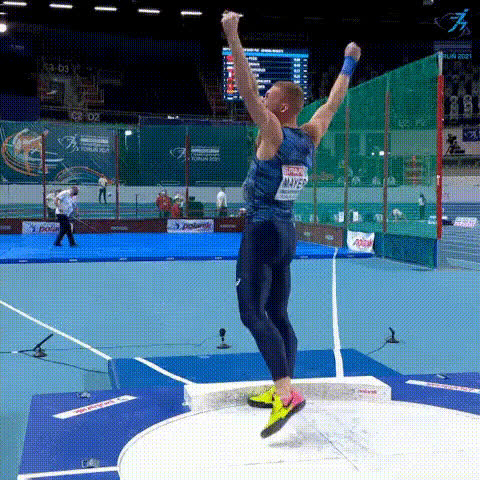
Hala Wrist Montage

face-swap

1 clip
2 uses

Any aspect ratio

Tags

sports

Hala Wrist Montage – Face Swap Video Template

The Hala Wrist Montage template is a ready‑made AI face swap video experience built for Magic Hour. It’s designed for creators and teams who want to quickly produce short, high‑impact clips where faces change in a rhythmic “wrist montage” style — ideal for social, UGC ads, and creator content.

This template is powered by Magic Hour’s AI Face Swap engine and runs inside the Face Swap Video workflow, so you can remix it, customize it, and scale it into your own format in minutes.


What This Template Does

The Hala Wrist Montage template helps you:

  • Auto‑swap faces across a pre‑designed montage so different people (or characters) appear in rapid succession.
  • Keep consistent framing and pacing so your output looks intentional, not random.
  • Generate multiple variations fast for A/B testing thumbnails, hooks, and storylines.
  • Export platform‑ready videos for TikTok, Instagram Reels, YouTube Shorts, or paid ads.

Use it for:

  • Creator intros and transitions
  • Influencer or UGC ad concepts
  • Before/after style edits (e.g., styling, fashion, transformations)
  • Reaction memes and comedic cutaways

How Face Swap Works (at a High Level)

Magic Hour’s Face Swap system uses deep learning–based face detection, alignment, and blending to:

  1. Detect faces in your source video frames.
  2. Extract identity features (facial structure, relative geometry, key landmarks).
  3. Generate a new face that matches the pose, lighting, and expression of the original frame.
  4. Blend it back into the video with natural shadows, skin tones, and motion consistency.

If you want to go deeper into AI face editing and synthesis, related tools on Magic Hour include:


How to Remix This Template in Magic Hour

You don’t need to start from zero. You can remix the Hala Wrist Montage and turn it into your own reusable format. At a high level:

  1. Open the Face Swap Video creator
    Go to Face Swap Video and choose the Hala Wrist Montage template as your starting point. This gives you pre‑structured timing and shot layout.
  2. Add your base footage
    Upload your source video clips for the montage moments (e.g., wrist shots, transitions, quick cuts). For best results, use:
    • Clear, front‑facing or ¾‑view faces
    • Good lighting and minimal motion blur
    • Short, punchy shots rather than long takes
  3. Choose the faces you want to swap in
    You can use:
  4. Align your montage beats
    Arrange your clips so that each wrist/beat/frame change introduces a new face. Think of it as:
    • Beat 1 – Person A
    • Beat 2 – Person B
    • Beat 3 – Person C
    • Beat 4 – Callback (Person A again)
    This structure tends to perform well in short‑form content because it creates anticipation and payoff.
  5. Polish the visuals
    Before exporting, you can:
  6. Export and test
    Export your final montage and test it on the platform you care about most. For creators and marketers, it’s often worth generating a few variants with different faces, first shots, or hooks to compare performance.

Advanced Use Cases for Creators & Teams

Because this template is modular, you can repurpose it in several ways:

  • UGC and influencer ads
    Swap in your product users, ambassadors, or influencers to test which faces and micro‑expressions convert better in paid campaigns.
  • Multi‑persona storytelling
    Show different “versions” of the same person (work, gym, nightlife, gamer, etc.). You can even generate some personas with the AI Character Generator or Avatar Generator and then bring them into the montage.
  • Stylized or animated variations
    Use Video‑to‑Video or Animation to stylize the same montage in different looks (anime, comic book, cinematic, etc.) while preserving timing and face swaps.
  • Talking or lip‑synced montage
    Combine this template with:

Best Practices for High‑Quality Face Swap Montages

  • Use clean, high‑resolution source images
    Sharp faces with clear eyes and natural lighting usually produce the most convincing swaps. If your source is low‑quality, run it through Unblur Image or AI Image Upscaler first.
  • Maintain consistent lighting and angles
    While the model can adapt across a range of poses, keeping angles and lighting roughly consistent across clips will reduce artifacts and make the montage feel smoother.
  • Plan your narrative beats
    Even a 10–15 second montage benefits from structure:
    • Hook (first 1–2 seconds)
    • Variation (new faces / unexpected swap)
    • Escalation (faster cuts / more surprising swaps)
    • Payoff (a punchline, reveal, or transformation)
  • Respect consent and platform policies
    When working with real people’s likenesses, ensure you have permission and comply with platform guidelines for synthetic media and deepfakes. Many platforms require disclosure when content is AI‑generated.

Related Magic Hour Tools to Extend This Template

You can combine the Hala Wrist Montage with other Magic Hour tools to build more sophisticated workflows:


Why Face Swap Montages Perform Well

Short‑form research and platform analytics consistently show that:

  • Frequent visual changes (cuts, face changes, angle shifts) increase retention in the first few seconds.
  • Recognizable or surprising faces create immediate pattern breaks, which helps stop scrolling.
  • Clear, punchy structure (hook → escalation → payoff) supports shares and completions, especially in meme and UGC formats.

The Hala Wrist Montage template is built to align with those principles while giving you enough flexibility to adapt it to your brand, channel, or creative voice.


Get Started

To use or remix the Hala Wrist Montage template, open the Face Swap Video creator in Magic Hour and select the template as your base. From there, swap in your own footage, faces, and story beats – and turn a simple wrist montage into a reusable, high‑performing content format for your channel or campaign.

More Like This