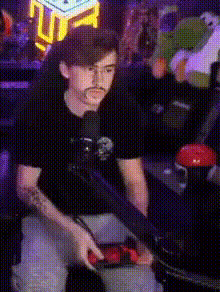
When you realize the enemy team is targeting your other support player 🔫 #overwatchcosplay #mercycosplay #mercymain
face-swap
Any aspect ratio
Tags
cosplayWhen You Realize the Enemy Team is Targeting Your Other Support Player 🔫
Turn a Classic Overwatch Moment Into a Personalized Meme
Every support main knows this moment: you’re mid-fight, plates spinning, cooldowns burning, and suddenly you realize the enemy team has stopped shooting your tank and is hard-diving your other support. Panic. Triage. Tactical retreat. Or a glorious 5‑man save.
This Magic Hour template, “When you realize the enemy team is targeting your other support player 🔫”, lets you turn that feeling into a short, shareable meme video — with your own face or your friends’ faces swapped into the clip using Magic Hour’s AI Face Swap technology.
What This Template Is For
Designed for Overwatch, Overwatch 2, and hero-shooter creators, this template is ideal for:
- Creating ranked highlight memes about support diff, dive comps, or bad positioning
- Reacting to scrim VODs, pro play, or Contenders/OWL-era clips
- Posting short, face-based meme videos on TikTok, YouTube Shorts, X, or Instagram Reels
- Clans/teams creating inside-joke content featuring teammates’ faces
How the Template Works (Face Swap + Meme Structure)
This template uses Magic Hour’s Face Swap engine to replace the face in a pre-structured Overwatch-style meme clip with your own (or any face you upload). Under the hood, it relies on the same core technology that powers the main AI Face Swap product and the Face Swap Video creation flow.
You don’t need traditional editing tools. The flow lives inside Magic Hour, so you can:
- Start with this template’s pre-timed reaction format (setup, realization, punchline)
- Swap in a new face (you, a teammate, a streamer, or a fictional character)
- Optionally remix into other AI video flows like Video to Video or Animation for stylized looks
How to Remix This Template in Magic Hour
You can treat this template as a starting point and remix it into your own series of “support targeted” memes. A typical workflow:
- Open a Face Swap Video template
Start from Face Swap Video and choose this “Enemy team is targeting your other support” template as your base structure. - Upload your source face
Use a clear, front-facing selfie or headshot (good lighting, minimal motion blur). If you don’t have one yet, you can generate consistent faces with tools like the AI Face Editor, Avatar Generator, or AI Headshot Generator. - Apply the Face Swap to the template
Swap the face onto the support character in the clip. You can also experiment with swapping multiple characters using different uploads if you’re building a full team meme. - Remix the visual style (optional)
Want anime Mercy, cyberpunk Ana, or Pixar-style support chaos? Pipe your result through:- Video to Video for stylized transformations
- Animation for animated or toon-like versions
- AI Anime Generator or Disney AI Generator to design the character look you want first, then echo that aesthetic in your video
- Add text, captions, and meme framing
Once your swapped video is ready, you can:- Export and bring it into your editing stack for overlays, or
- Use Magic Hour’s other tools to support your workflow:
- Auto Subtitle Generator for fast, platform-ready captions
- Thumbnail Maker to build a clickable YouTube or VOD thumbnail
- Ship to platforms where your audience lives
Export at short-form-friendly lengths and post to TikTok, YouTube Shorts, Instagram Reels, or X, tagging Overwatch communities, streamers, and your teammates.
Ideas to Customize This Template
Because the “enemy team targeting your other support” scenario is so universal, you can spin it in multiple directions:
- Ranked Ladder POV – Swap your face on the support and add on-screen text like “Gold Ana when Genji presses Q” or “Top 500 Mercy watching the dive start.”
- Team POV / Scrim Review – Put each teammate’s face on the different characters and turn your VOD review pain into a shareable meme for your Discord.
- Streamer / Pro Crossover – Swap a pro player or streamer’s face (with permission/within fair use) and caption it with their signature line or comp.
- Alt-game Memes – Even if your main game isn’t Overwatch, you can re-caption to fit VALORANT, Apex, League of Legends, or any meta where supports get focused.
Pair this template with other Magic Hour tools to extend the idea:
- AI Meme Generator to draft static meme variants for Twitter/X and Discord
- AI Talking Photo to turn a still of your support hero into a talking reaction clip
- AI GIF Generator or Face Swap GIF for quick reaction GIFs in team chats
Why Face Swap Works So Well for Overwatch Content
Overwatch and Overwatch 2 are team-based hero shooters from Blizzard Entertainment, built around:
- Role-based gameplay (tank, damage, support)
- Diverse cast with visually distinct heroes like Mercy, Ana, Lucio, Kiriko, and Baptiste
- High-scramble fights where target focus, ultimate economy, and peel decide fights
Support players are often high-value targets and frequently focused first in coordinated attacks. That’s why the “they’re targeting our other support” realization has become a meme in Reddit threads, Twitch chats, and montage videos — it’s recognizable even out of context.
Face Swapping that moment lets you:
- Make the clip instantly personal (your face = your POV)
- Translate complex in-game context into an easy-to-read reaction video
- Help non-gamers understand the joke by seeing a visible “oh no” expression on your face
Quality Tips for Better Face Swaps
For stronger, more believable results:
- Use high-quality source photos
Sharp, front-facing images with neutral expressions and consistent lighting tend to swap best. If your original photo is low-res or blurry, try improving it with the AI Image Upscaler or Unblur Image tool. - Match vibes
If the character is panicking, pick a source face that isn’t completely deadpan. Even small expression matches can make the final result look more natural. - Keep backgrounds clean
If you’re generating faces or stills first using AI Image Generator or AI Photo Generator, use simple backgrounds or remove distractions with the Image Background Remover or Remove Object from Photo. - Stay on-brand for your channel
If you’re a serious educational creator, focus on subtle humor and context overlays. If you’re meme-first, lean into exaggerated faces and absurd hero combinations.
Advanced Remix: Build a Whole “Support Targeted” Content Series
For creators, teams, and orgs who want to do more than a one-off meme, you can systematize this template:
- Seasonal variations – New meta? New patch? Update the captions and quickly produce a new batch of videos reusing this template skeleton.
- Character-specific versions – Create one version per support hero (Mercy, Ana, Kiriko, Baptiste, Illari, etc.), swapping in hero-themed overlays and different face swaps.
- Cross-format content – Use:
- AI Image Generator or AI Art Generator to design cover images
- Thumbnail Maker for YouTube uploads of compilations
- AI QR Code Generator to link from event posters or Discord to your montage playlist
- Voice and dialogue – Combine this face-swap template with:
- AI Voice Generator or AI Voice Cloner to create reactions or callouts
- Text to Video to build explainer clips about target focus and peeling strategies
Who This Template Is Best For
- Creators & streamers looking to quickly spin up Overwatch or hero-shooter meme content with their own face
- Esports teams & orgs wanting consistent, branded social clips around scrims and match days
- Coaches & analysts using humor to teach concepts like focus fire, backline pressure, and peel
- Startup builders & marketers in gaming who need fast, repeatable content that feels native to gamer culture
Combine With Other Magic Hour Tools
To go beyond this single meme format and build a complete content pipeline, consider integrating:
- Image to Video – Turn hero concept art or team mascots into short motion clips.
- AI GIF Generator – Export short “panic when they dive our Zen” loops for Discord reactions.
- AI Logo Generator and Album Cover Generator – Create branded assets for your team or channel.
- Video Upscaler – Clean up older clips or low-res meme exports for higher-quality reposts.
Get Started
Open the Face Swap Video creator, select the “When you realize the enemy team is targeting your other support player 🔫” style of template, upload your face, and generate your first clip. From there, you can iteratively remix, restyle, and scale this into a whole meme series for your Overwatch or hero-shooter audience.
Use this template as your base, then let Magic Hour handle the heavy lifting so you can stay focused on strategy, storytelling, and the next fight where — inevitably — someone forgets to peel for your other support.