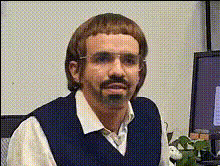
"My perfect Valentines Day?" - Dwight Schrute
face-swap
Any aspect ratio
Tags
memes“My Perfect Valentine’s Day?” — Dwight Schrute Face Swap Template
Overview
The “My Perfect Valentine’s Day?” template lets you drop straight into a classic Dwight Schrute monologue using AI face swap. In a few minutes, you can put your own (or someone else’s) face into an iconic Valentine’s Day scene inspired by The Office—no video editing experience required.
This template is powered by Magic Hour’s AI Face Swap technology and can be remixed, customized, and reused for campaigns, memes, or personalized messages.
Who This Template Is For
- Creators & meme accounts who want fast, high-quality character content around Valentine’s Day.
- Marketers & brands looking for a humorous hook for seasonal campaigns or social posts.
- Startup builders & product teams testing character-driven content, social virality, or UGC-style ads.
- Developers & technical users exploring AI video workflows and how face swap fits into content pipelines.
Why Dwight Schrute Works for Valentine’s Day
Dwight Schrute (played by Rainn Wilson) is one of the most recognizable characters from NBC’s The Office. His deadpan delivery, intense logic, and offbeat romantic history (with Angela, hay bale dates, beet farm proposals) make him perfect for:
- Anti-romantic or “realist” Valentine’s content.
- Meme-style videos that play off awkward dates, office crushes, or relationship hot takes.
- Relatable workplace Valentine’s posts for LinkedIn, Slack communities, and internal culture content.
Because the character is so well known in pop culture, viewers instantly get the joke—making this template ideal for high engagement on TikTok, Instagram Reels, YouTube Shorts, and X.
What This Template Does
The “My Perfect Valentine’s Day?” template uses Magic Hour’s AI Face Swap to place your face into a Dwight-style Valentine’s monologue. Key capabilities include:
- AI Face Swap on pre-built footage: Your face (or a character you’ve generated) is mapped onto Dwight’s performance to create a realistic, animated talking head in context.
- Valentine’s-ready pacing and framing: The scene is structured for short-form vertical platforms and quick punchlines.
- Room for customization: You can remix the core idea—changing faces, using alternate footage, or pairing it with other Magic Hour tools.
How to Remix This Template in Magic Hour
You can recreate or extend this template using Magic Hour’s creation tools. A typical workflow:
- Start from the Face Swap video creator
Go to the Face Swap Video page to begin with a guided flow designed for swapping faces into existing clips. - Pick or upload your base clip
Use:- A licensed Dwight-style clip you already have permission to use, or
- Any office-style or talking-head Valentine’s video you want to “Dwight-ify.”
- Prepare your face source
Upload a clear image of the face you want to swap in. You can generate or refine this face using:- Avatar Generator for stylized personas.
- AI Headshot Generator for professional, realistic faces.
- AI Face Generator for entirely synthetic characters.
- Run the face swap
Let Magic Hour apply AI face swap to the video. The model handles alignment, expressions, and lighting to keep the result coherent with the original performance. - Enhance the result (optional)
To level up the final video:- Sharpen or upscale the output with Video Upscaler.
- Add automatic captions with the Auto Subtitle Generator for social platforms.
- Clean or tweak any source images with the AI Image Editor or AI Image Upscaler.
- Export and publish
Download the finished clip and publish it directly to TikTok, Reels, Shorts, or your campaign landing page.
Advanced Remix Ideas
If you want to go beyond a simple face swap and build your own Dwight-inspired Valentine’s template, you can chain multiple Magic Hour tools:
- Turn a static Valentine’s image into a moving scene
Start with an illustration or still photo, then animate it with Image to Video or Video to Video, then apply face swap. - Add custom dialogue
Pair the visuals with:- AI Voice Generator or AI Voice Cloner for character-like narration.
- AI Talking Photo if you want to quickly test new scripts on still images before moving to full video.
- Branch into other Valentine’s content types
Use the same character and face for:- Animated GIFs with the AI GIF Generator.
- Memes and static posts via the AI Meme Generator.
- Thematic art and covers with the Album Cover Generator or Book Cover Generator.
Related Templates & Tools for Similar Content
If you like this template, you can extend the idea into other formats:
- Lip Sync – Put your Dwight-style character over trending audio or romantic songs.
- Animation – Turn your character into a stylized animated version for Valentine’s shorts or explainer content.
- Text to Video – Generate entirely new Valentine’s scenes from a written prompt, then apply face swap for continuity with this template.
- Face Swap GIF – Create looping Dwight-style Valentine’s reaction GIFs for chats, email campaigns, or community posts.
Best Practices for High-Impact Valentine’s Content
- Keep it short and punchy: Aim for 6–20 seconds for social platforms; front-load the joke or twist.
- Use captions by default: A large share of viewers watch on mute—pair this template with automatic subtitles via the Auto Subtitle Generator.
- Match tone to audience: Dwight-style deadpan humor works well for “anti-Valentine’s” campaigns, workplace jokes, and tech/startup communities.
- Stay within your rights: If you upload your own clips or likenesses of real people, ensure you have the appropriate rights and permissions before distributing the video.
Example Use Cases
- Social media campaign: A B2B SaaS brand posts “Dwight explains our idea of a perfect customer relationship” for a Valentine’s-themed LinkedIn or Twitter thread.
- Internal culture content: HR or internal comms teams send a Dwight-face-swapped video to the company about “perfect workplace Valentine’s etiquette.”
- Personal Valentine’s greeting: Send friends or partners a custom Dwight-style monologue about “schrute-approved romance.”
- UGC-style ad testing: Marketers quickly prototype humorous creative featuring a recurring character to test engagement and click-through around Valentine’s week.
Get Started
To remix or recreate the “My Perfect Valentine’s Day?” template:
- Open the Face Swap Video creator.
- Upload your base clip and your face source.
- Run the face swap, then enhance with subtitles, upscaling, or additional Magic Hour tools as needed.
Once you’ve built one Dwight-style Valentine’s clip, you can reuse the same face, voice, and style across multiple campaigns and templates inside Magic Hour’s ecosystem.