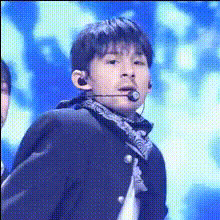
Kpop ending fairy edit - glitch mode

Magic Hour Profile Picture
by kpop_stan

face-swap

1 clip
9 uses

Any aspect ratio

Tags

kpop

K‑Pop Ending Fairy Edit – Glitch Mode (Face Swap Template)

Create your own K‑pop “ending fairy” moment with a glitchy, stylized twist. This template uses Magic Hour’s AI Face Swap to transform any performance clip into a dynamic, idol-style ending shot – complete with edgy glitch aesthetics that feel native to TikTok, Reels, and K‑pop edits on YouTube and Twitter.

What is the K‑Pop Ending Fairy Edit – Glitch Mode?

In K‑pop, the “ending fairy” is the idol who gets the final close-up at the end of a music show performance – usually holding a pose, wink, or playful expression. This template recreates that iconic moment and lets you:

  • Swap the idol’s face with your own, a friend’s, or a character
  • Wrap it in a polished glitch-style edit that looks ready for social media
  • Turn any performance or fancam into a personalized, viral-ready clip

It’s ideal for creators, editors, marketers, and fandom accounts who want high-quality K‑pop style content without spending hours in After Effects or advanced editing tools.

How this Face Swap template works in Magic Hour

This template is built on Magic Hour’s Face Swap engine, the same technology behind the core Face Swap and Face Swap GIF products. Under the hood, it uses deep learning–based facial detection and mapping to track the target face frame‑by‑frame and blend your source face naturally into the scene.

At a high level, you’ll:

  1. Start from the template: Open the K‑Pop Ending Fairy Edit – Glitch Mode template from the Magic Hour template library.
  2. Upload your video: Use a K‑pop stage performance, fancam, dance cover, or any close‑up shot where the “ending fairy” moment is visible.
  3. Upload your face (or another face): Add a clear photo or video of the face you want to swap in (you, a friend, a character, etc.).
  4. Let Magic Hour process: Magic Hour analyzes facial landmarks, pose, and lighting to composite your face onto the idol in the ending shot.
  5. Export and share: Download your video for TikTok, Reels, Shorts, or as part of a longer edit.

You’re not required to tweak complex controls – the template handles tracking, blending, and timing for you, so the output looks consistent even if you’ve never done VFX before.

Template features

  • High‑quality Face Swap: Built on Magic Hour’s Face Swap model, designed to keep expressions, head movements, and lighting as natural as possible.
  • Glitch Mode styling: Pre‑designed glitch overlays and transitions give your ending shot a modern, cyber or “edit” feel similar to popular TikTok and fan edits.
  • Creator‑friendly timing: The template aligns around the final “ending fairy” beat, so you focus on picking a good clip, not keyframing.
  • Remixable base: You can duplicate the project and build new variants – different colors, overlays, text, or additional cuts – while keeping the Face Swap logic intact.
  • Optimized for short‑form video: Perfect for vertical content on TikTok, Instagram Reels, YouTube Shorts, and Twitter/X.

How to remix this template in Magic Hour

If you want to build your own version of the K‑pop Ending Fairy Glitch template (for a brand, fan account, or client), use this as a starting workflow:

  1. Duplicate the template: Open the K‑Pop Ending Fairy Edit – Glitch Mode project in Magic Hour and save a copy. Treat this copy as your “base preset.”
  2. Swap in different performances: Replace the original video with:
    • Other K‑pop stages or fancams
    • Dance covers you or your team recorded
    • Brand or UGC clips where you want an “ending pose” moment
  3. Change the identity: Swap in:
    • Your own selfies (for fan edits and stan Twitter content)
    • Brand ambassadors, models, or virtual influencers
    • AI‑generated characters created with tools like the AI Character Generator or AI Anime Generator
  4. Combine with other Magic Hour tools: For more advanced remixes:
  5. Create your own “glitch pack” version: Duplicate and adjust the visual style across multiple copies so you have:
    • A subtle glitch version for more serious edits
    • A heavy glitch / experimental version for stylized fan cams
    • A brand‑colored version that matches client palettes or fandom colors

Best practices for face swapping K‑Pop content

To get strong, shareable outputs that feel intentional (not uncanny), keep in mind:

  • Use clear, front‑facing source images: For the face you’re swapping in, pick photos with good lighting and a neutral or slightly expressive pose. Avoid heavy motion blur or extreme angles.
  • Match lighting and vibe: If the ending shot is brightly lit and colorful, use a similarly lit face. Consistent lighting helps the swap look more natural.
  • Choose scenes with a stable close‑up: Ending fairy shots are usually tight close‑ups or half‑body shots with a clear view of the face – these work best for Face Swap.
  • Respect usage rights: Make sure you have the right to use both the source face and the underlying video, especially for commercial or branded work.
  • Test short clips first: Run 3–10 second tests before committing longer edits so you can quickly iterate on which performances and faces work best.

Use cases for creators, marketers, and teams

This template is more than a fandom toy – it can plug into real workflows for content teams and startups:

  • Fan edits and stan accounts: Insert yourself or your mutuals into comeback stages, encore performances, and fancams; build series like “ending fairy of the week.”
  • Dance cover creators: Use Face Swap to align your identity with idol visuals or concept shots, then cut them together with your real performance footage.
  • VTubers and virtual idols: Create consistent “ending fairy” segments for your avatar by generating a face with the Avatar Generator or AI Face Generator and swapping it onto real performances.
  • Brand / campaign content: Localize K‑pop‑style campaigns by swapping in local ambassadors, creators, or customers for region‑specific social assets.
  • Meme and trend content: Combine this template with the AI Meme Generator to rapidly respond to K‑pop trends, challenges, or viral sound bites.

Related Magic Hour tools for K‑Pop and edit culture

If you’re building a full K‑pop editing stack around this template, the following tools integrate well:

  • Face Swap Video – Full‑length performance swaps for entire stages or dance practices.
  • Video to Video – Stylize performances into anime, comic, or stylized looks while keeping motion.
  • Animation – Turn your ending fairy into an animated sequence or character loop.
  • AI Image Editor – Clean up, recolor, or restyle thumbnails and stills from your edits.
  • Thumbnail Maker – Generate eye‑catching thumbnails for YouTube and long‑form K‑pop edit compilations.
  • Auto Subtitle Generator – Instantly add subtitles, lyrics, or captions to your ending fairy clips.
  • AI Voice Generator and AI Voice Cloner – Create voiceovers, commentary, or character lines to layer over your edits.

K‑Pop ending fairy culture & glitch aesthetics

Ending fairy cuts became widely recognized through Korean music shows like Mnet’s M Countdown, KBS Music Bank, SBS Inkigayo, and MBC Show! Music Core, where the camera isolates one idol at the very end of the performance. Fans now track which member “gets the ending,” and the moment often becomes a meme, fan cam, or key promotional asset.

Glitch effects—digital distortion, RGB splits, and frame tearing—have become common in fan edits, trailer cuts, and performance teasers across K‑pop, particularly for cyberpunk, futuristic, or “glitch mode” concepts. This template fuses those two ideas: the focused emotional payoff of an ending fairy shot with stylized glitch visuals optimized for algorithm‑friendly short‑form content.

Getting the most out of this template

  • Build a repeatable series: Use the same structure weekly with different comebacks or faces so your audience knows what to expect.
  • Combine with AI characters: Design idols or OCs using the AI Character Generator, then Face Swap them into real performances for concept exploration or pitch decks.
  • Enhance old content: Restore and upscale older clips with Unblur Image, Old Photo Restoration, and the Video Upscaler before applying the ending fairy swap.
  • Create multi‑platform variants: Use one swapped clip as the base and repurpose it into:

Summary

The K‑Pop Ending Fairy Edit – Glitch Mode template combines:

  • State‑of‑the‑art Face Swap from Magic Hour
  • Pre‑built glitch aesthetics tailored to K‑pop edit culture
  • A remixable structure you can adapt for fan edits, campaigns, and character experiments

If you want to quickly prototype K‑pop‑style content, personalize idol moments, or test virtual idol concepts without building everything from scratch, this Face Swap template gives you a fast, production‑ready starting point you can keep remixing inside Magic Hour.

More Like This