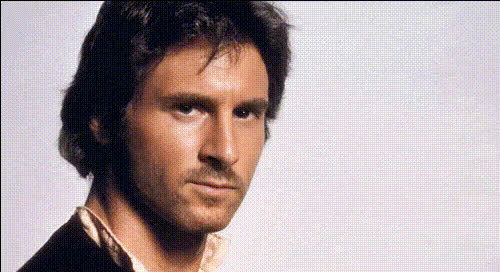
"Obi Wan, may the force be with you" - Star Wars

face-swap

1 clip
6 uses

Any aspect ratio

Tags

movies

“Obi‑Wan, May the Force Be With You” – Star Wars Face Swap Video Template

Step into the Star Wars universe and appear on screen as Obi‑Wan Kenobi himself. This “Obi‑Wan, May the Force Be With You” template uses Magic Hour’s Face Swap engine to place your face into an iconic Jedi scene—perfect for short social clips, campaign stingers, fan edits, or internal team memes.

Built on the same technology that powers Magic Hour Face Swap, this template lets you generate a polished, share‑ready video in minutes, without editing skills or VFX tools.

What This Template Does

  • Face Swap with Obi‑Wan Kenobi: Automatically replace the character’s face with your own, while preserving lighting, angle, and movement.
  • High‑quality character performance: Keep the original acting, timing, and motion—only the identity changes.
  • Short, reusable format: Ideal for TikTok, Reels, YouTube Shorts, intros, and reaction memes.
  • Fast remixing: Use this template as a base, then swap in different faces, clips, or outputs for new variations.

If you want to build something similar from scratch, you can also start directly from the Face Swap Video creation page and recreate the same flow with your own source clip.

How to Remix This Template in Magic Hour

You don’t need to understand the underlying ML models—just follow a simple workflow. To create your own version of this “Obi‑Wan, May the Force Be With You” template:

  1. Start from the template
    Open the template inside Magic Hour. Use it as‑is, or duplicate it into your own workspace to customize and iterate.
  2. Upload the face you want to appear as Obi‑Wan
    Use a clear photo or short clip of the target face (you, an actor, your founder, or brand mascot). For best results:
    • Use a well‑lit, front‑facing image with minimal occlusions (no large sunglasses, heavy masks, etc.).
    • Choose an expression and angle that roughly match the performance in the scene.
  3. Apply Face Swap to the base clip
    The template is pre‑configured around a specific shot (“May the Force be with you”). When you run it, Magic Hour’s AI Face Editor stack handles:
    • Identity transfer (replacing the face while preserving performance).
    • Lighting and color consistency with the original scene.
    • Frame‑by‑frame temporal coherence to avoid flicker.
  4. Preview and iterate
    Generate a preview to check alignment, expressions, and realism. If needed, try:
    • A different reference face photo.
    • A variant of the base video (e.g., another take or a different clip you provide).
  5. Export and repurpose
    Once you’re happy with the result, export and adapt the clip for:
    • Social content and UGC campaigns.
    • Internal team jokes or product launch Easter eggs.
    • Personalized greetings, invites, or “May the Force be with you” sign‑offs.

Creating Your Own Obi‑Wan‑Style Template from Scratch

Want a fully custom Jedi scene instead of just using the default? You can recreate this template using other Magic Hour tools:

  1. Generate or edit your base image or frame
    Start with a Star‑Wars‑inspired (but not infringing) scene using:
  2. Turn stills into motion if needed
    Use:
    • Image to Video to animate a single Jedi frame into a short clip.
    • Video‑to‑Video to stylize existing footage into a more cinematic or “space opera” aesthetic.
    • AI Talking Photo if you want Obi‑Wan‑style talking portraits instead of full‑body action.
  3. Apply Face Swap
    Once you have a base video clip:
    • Open Face Swap Video.
    • Use the clip as your source and upload the face you want as the target.
    • Run the swap and review the output; this replicates the logic behind the “Obi‑Wan, May the Force Be With You” template.
  4. Optional: Add voice and lip sync
    To go beyond visuals:

Why Obi‑Wan and “May the Force Be With You” Work So Well

Obi‑Wan Kenobi is one of the most recognizable figures in the Star Wars canon, appearing across:

  • Star Wars: Episode I – The Phantom Menace (1999)
  • Star Wars: Episode II – Attack of the Clones (2002)
  • Star Wars: Episode III – Revenge of the Sith (2005)
  • Star Wars: Episode IV – A New Hope (1977)
  • Expanded media, including the Obi‑Wan Kenobi Disney+ series and animated series like The Clone Wars

The phrase “May the Force be with you” is one of the franchise’s most quoted lines. It’s used in the films as a blessing, farewell, and show of moral support—making it ideal for:

  • Product launch sign‑offs or campaign punchlines.
  • Customer or community shout‑outs.
  • Internal messages to teams (e.g., “May the Force be with you this quarter.”).

Because the line is short, memorable, and emotionally loaded, it compresses very well into a 5‑ to 15‑second video format—exactly what AI video tools are best at generating and iterating.

Practical Use Cases for Creators, Marketers, and Builders

  • Founders & startups: Record your founder as Obi‑Wan delivering a short blessing for a launch, fundraise, or community milestone.
  • Marketers: Create themed content around May 4th (“Star Wars Day”), sci‑fi campaigns, or culture‑driven ads.
  • Creators: Produce reaction clips, duets, and stitches where you or your audience appear as Jedi.
  • Community & events: Send personalized “May the Force be with you” messages to attendees, partners, or contributors.

For GIF‑style reactions, you can also adapt your final video into a looping GIF using AI GIF Generator or experiment with Face Swap GIF for lighter, shareable formats.

Tips for High‑Quality Jedi Face Swaps

  • Match the angle: Use a reference photo with a similar angle (3/4 view vs straight‑on) to the original Obi‑Wan shot.
  • Keep lighting simple: Well‑lit faces with neutral shadows swap more cleanly into cinematic scenes.
  • Avoid heavy occlusions: Remove large hats, heavy filters, or objects covering key facial landmarks.
  • Leverage upscaling: For crisp results on larger screens, run your output through the AI Image Upscaler (for frames) or Video Upscaler (for the full clip).
  • Test multiple reference faces: Different photos of the same person can dramatically change perceived realism—keep a small library and test quickly.

Related Magic Hour Tools to Extend This Template

Once you’re comfortable with this Obi‑Wan template, you can build a small “Star‑Wars‑style” toolkit inside Magic Hour:

Ethical and Legal Considerations

Face Swap is powerful. When using this template:

  • Use faces you have rights to: Your own image, consenting collaborators, or properly licensed talent.
  • Avoid misleading uses: Don’t present swapped videos as real footage when it could cause harm, confusion, or reputational damage.
  • Respect trademarks and IP: Use this template for parody, fan content, internal culture, and inspiration. For commercial campaigns, coordinate with your legal team regarding franchise references, characters, and likeness rights.

From Template to Your Own Galaxy

The “Obi‑Wan, May the Force Be With You” template is a fast way to learn what’s possible with AI‑driven Face Swap: short, cinematic, identity‑aware clips you can iterate on quickly. Start with this ready‑made Jedi scene, then remix it into your own branded universe using Magic Hour’s Face Swap Video, Text‑to‑Video, Video‑to‑Video, and related tools.

Whether you’re a creator, marketer, or founder, this template gives you a fast, low‑friction way to turn a legendary line—“May the Force be with you”—into a personalized, on‑brand moment your audience will remember.

More Like This