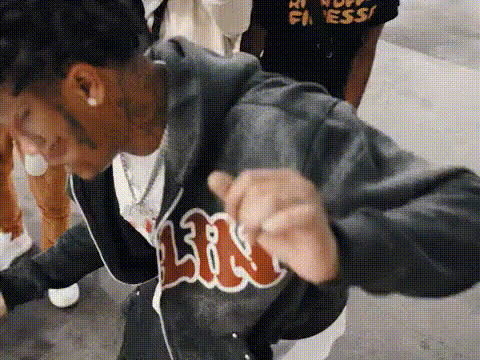
I'm a baddy group dance

face-swap

1 clip
3 uses

Any aspect ratio

Tags

music video

“I’m a Baddy” Group Dance – Face Swap Video Template

Create fast, viral-ready group dance videos by putting any face on any dancer. The “I’m a Baddy Group Dance” template uses Magic Hour’s AI Face Swap technology to turn a pre-choreographed dance into a personalized, shareable clip for TikTok, Instagram Reels, YouTube Shorts, and more.

What This Template Does

This template gives you a pre‑built group dance scene where you can automatically replace the dancers’ faces with your own, your friends’, teammates’, or characters you generate with AI. The result is a polished “I’m a Baddy” style dance video without having to film or choreograph anything yourself.

It’s built on Magic Hour’s Face Swap Video workflow, so you can:

  • Upload one or more face photos
  • Map each face onto a dancer in the group
  • Generate a consistent, lip‑synced, motion‑matched dance clip that’s ready to post

How to Remix This Template in Magic Hour

  1. Start from Face Swap Video
    Open the Face Swap Video tool. This is the core product used by the template and the easiest way to remix it for your own use case.
  2. Choose or recreate the base dance video
    You have two options:
  3. Prepare your faces
    Collect good, well‑lit face photos for everyone you want in the video (friends, team members, fictional characters, etc.). For best results:
    • Use sharp, front‑facing images with neutral expressions
    • Avoid heavy sunglasses or extreme occlusions
    • Use separate images for each person you want to assign to a different dancer
    Upload these faces inside Face Swap Video.
  4. Assign faces to dancers
    In the Face Swap flow, map each uploaded face to a specific dancer in your base clip. This is how you recreate the “group of friends all doing the I’m a Baddy dance” effect.
  5. Generate, review, and iterate
    Generate the video, watch it through, and:
    • Re‑assign faces if you want different matchups
    • Try new face photos for better likeness or expression
    • Export multiple variants to test which version performs best on social

Advanced Remix Ideas

Because this template is built on AI face swapping, you can extend it using other Magic Hour tools:

Best Practices for High‑Quality Face Swap Dance Videos

  • Use clean source material
    Both the base dance video and the face photos should be sharp, well‑lit, and not overly compressed. If you’re reusing old or low‑res assets, pre‑process them with:
  • Match energy, not just faces
    If your base dancers are high‑energy, use expressive or slightly smiling face photos. This helps the swap feel natural and aligned with the “Baddy” vibe.
  • Keep it short and loop‑friendly
    For TikTok, Reels, and Shorts, 6–15 seconds often works best. Consider trimming in your editor and then exporting the final version with Auto Subtitle Generator for captions.
  • Design strong thumbnails
    Pull a frame with all swapped faces clearly visible, then refine it using:

Use Cases for Creators, Teams, and Brands

  • Creators & influencers
    Turn inside jokes, fandoms, or character personas into recurring “Baddy squad” formats. Combine with:
  • Marketing & growth teams
    Quickly prototype “everyone on the team is in this dance” campaigns:
    • Swap in executive or founder faces for product launch posts
    • Create localized variants with regional reps or creators
    • Generate multiple versions, then A/B test performance across platforms
  • Startups & product launches
    Use the template as a repeatable content asset:
    • Make a new “I’m a Baddy” dance every milestone (release, funding, community win)
    • Swap in user avatars or community members (with consent) for engagement‑driven campaigns
    • Turn your app’s mascots into dancing characters via Avatar Generator and Animation

Related Magic Hour Tools Worth Exploring

To expand beyond this single template and build a reusable content pipeline, consider pairing Face Swap with:

Why This Template Works on Social

  • Instant recognition: Group dance formats are a staple of TikTok and Reels; adding face swap makes them personal and share‑worthy.
  • Low production cost: No choreography, studio, or camera work required. You only need face photos and a base dance clip.
  • Easy remixing: Swap faces, change themes, alter backgrounds, or turn stills into memes and GIFs—without rebuilding from scratch.

Get Started

To create your own “I’m a Baddy Group Dance” video:

  1. Open Face Swap Video
  2. Upload or recreate a group dance base
  3. Add and assign your faces
  4. Generate, test, and publish across your social channels

From there, you can scale the same format into entire series, campaigns, and character universes using Magic Hour’s broader suite of AI video, image, and audio tools.

More Like This