Gummy
ai-image-editor
Any aspect ratio
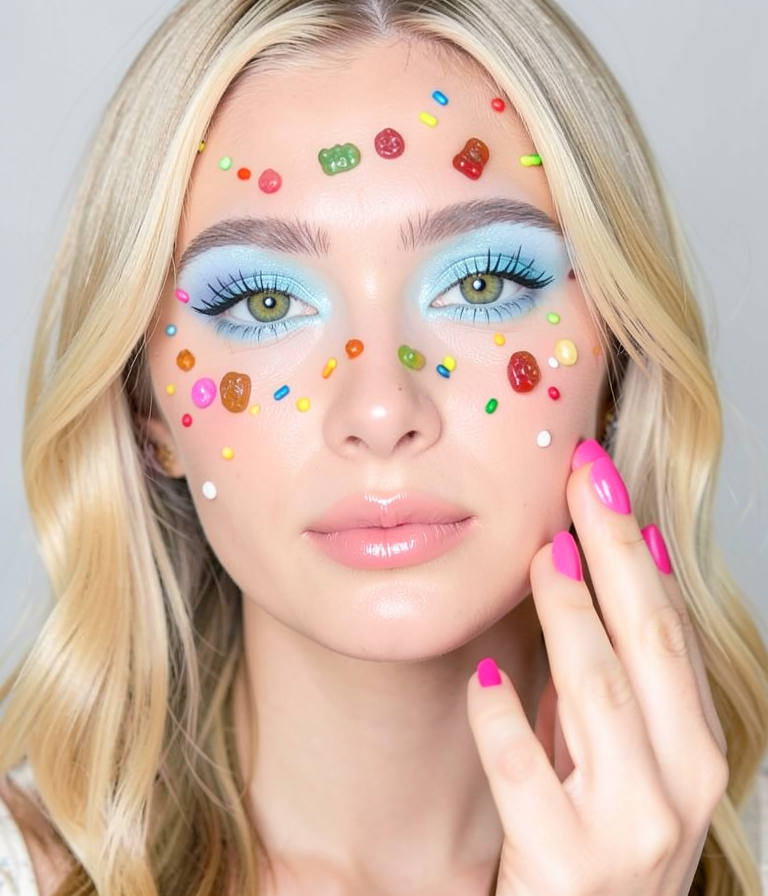
A close-up portrait of a woman with light blonde hair and bright green eyes. Her face is decorated with colorful sprinkles and gummy bears. She has vibrant pink nail polish on her neatly manicured nails. The makeup features pastel blue eyeshadow and glossy lips. The background is plain light grey, emphasizing her festive and playful look.
Overview
The Gummy AI Image Editor template leverages the flux-2-klein model to transform ordinary images into playful, festival-themed portraits. This template allows users to apply creative embellishments to portraits, achieving a vibrant and whimsical aesthetic.
What It Does
With Gummy, you can add colorful sprinkles, gummy bears, and festive makeup details to your images, making them stand out. The template uses AI Image Editor capabilities to artistically enhance your visuals with vibrant colors and textures, turning any portrait into a fun, eye-catching masterpiece.
Who It's For
Gummy is perfect for content creators, social media enthusiasts, and photographers looking to add a creative flair to their portraits. Whether you're preparing content for a personal blog or creating engaging visuals for social media, this template helps you achieve a unique look that captures attention.
Summary
Explore new creative possibilities with the Gummy template. Ideal for those in the fashion and beauty industry, it enhances images with playful decorations. For similar transformative tools, explore the AI GIF Generator and AI Image Generator for more visual effects.
How-To
Choose Template

Customize Your Inputs

Generate Image

Use Cases
Social Media Content
- Enhance personal photos for Instagram
- Create unique profile pictures
Digital Art Projects
- Design promotional posters
- Develop themed artwork for events
Marketing Campaigns
- Create eye-catching ads
- Enhance newsletters with lively images
Best Practices
Choosing the Right Image
Select close-up portraits with clear facial features for best results. The cleaner the base image, the more pronounced the effects will be.Experiment with Settings
Adjust the makeup and decoration settings to see how changes affect the image. Small tweaks can lead to significantly different results.Consider Background Simplicity
The plain light grey background is designed to highlight the decorations. Avoid busy backgrounds to keep the focus on the subject.