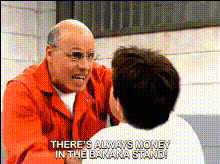
"I don't know what I expected" - Arrested Development
face-swap
Any aspect ratio
Tags
memes“I Don’t Know What I Expected” Meme Template – Arrested Development Face Swap
The “I Don’t Know What I Expected” meme has become one of the most widely referenced moments from Arrested Development—perfect for calling out failed plans, awkward outcomes, and “this went worse than I thought” moments. This Magic Hour template lets you drop yourself, your friends, or your characters directly into that reaction using AI face swap video.
Built on Magic Hour’s AI Face Swap technology, this template gives you a fast way to turn a familiar TV moment into a personalized, shareable meme or reaction clip.
What This Template Does
- Swaps faces into the Arrested Development reaction shot so you or your character become the person saying “I don’t know what I expected.”
- Preserves the original performance (timing, expression, and motion stay intact) while updating the face with your chosen identity.
- Outputs a ready-to-share video you can use as a meme, reaction, or short-form content piece across social, Slack, or internal decks.
Under the hood, Magic Hour uses generative models similar to modern face reenactment and identity transfer research (e.g., DeepFaceLab-style pipelines and diffusion-based face editing) to align your source face with the original shot. The result: a more coherent, less “deepfake-y” meme that still looks like the original scene.
Who This Template Is For
- Creators & editors who want fast, recognizable meme content without manual VFX work.
- Marketers & social teams turning cultural references into brand-relevant, on-message posts.
- Startup founders & product teams telling “we shipped the feature… and” or “launch didn’t go as planned” stories in a single clip.
- Developers & technical storytellers who want a visual shorthand for failed experiments, broken builds, or unexpected output.
How to Remix This Template in Magic Hour
You can either use this template as-is or build your own version in a few steps using Magic Hour’s face swap tools:
- Start from Face Swap Video
Go to Face Swap Video. Upload the Arrested Development “I don’t know what I expected” clip (or any similar reaction shot you have rights to use). - Add your source face
Upload a clear photo or short video of the person you want in the scene. For best results:- Use a forward-facing image with good lighting.
- Avoid heavy filters, sunglasses, or extreme angles.
- Match general age/gender to the original actor for more natural results.
- Generate your face swap
Let Magic Hour process the clip. The face in the original video will be replaced with your chosen identity, keeping the original expression, body language, and timing. - Export and repurpose
Download the finished video and use it:- As a Slack or Discord reaction.
- In short-form content (TikTok, Reels, YouTube Shorts).
- Inside presentations to visualize “failed expectations.”
If you want to build a more complex variation (for example, combining face swap with additional motion or stylized visuals), you can chain tools:
- Face swap your meme clip with Face Swap Video, then
- Stylize or transform it further with Video to Video or animate stills with Image to Video.
Ideas & Use Cases
The “I Don’t Know What I Expected” template works especially well when you’re calling out mismatched expectations vs. reality:
- Product & startup storytelling
- “We shipped v1 without onboarding… I don’t know what I expected.”
- “Launched paid ads with no tracking… I don’t know what I expected.”
- “Pushed to production on Friday afternoon…”
- Engineering & data science memes
- Model trained only on happy-path data.
- Hotfix merged directly to main.
- Ignoring edge cases in production systems.
- Marketing & growth content
- Running campaigns without audience research.
- Expecting virality from a single organic post.
- Launching without pricing or positioning aligned.
- Internal comms & culture
- Quarterly retrospectives.
- All-hands icebreakers.
- Post-mortems and incident reviews.
Advanced Remix: Variants You Can Build
Once you have the base Arrested Development clip working, you can easily create a library of variations:
- Swap different faces for different teams
Generate one version per team lead or persona, then reuse in team-specific channels. - Create animated or stylized versions
Turn the reaction into:- An anime-style meme with AI Anime Generator.
- A comic-book frame using Comic Book Generator.
- A stylized illustration reaction with AI Illustration Generator.
- Make GIF reactions
Convert your face-swapped clip into a looping GIF and pair it with:- AI GIF Generator for fast, shareable loops.
- Face Swap GIF for GIF-native face swaps.
- Add talking-photo or lip-sync variants
If you prefer a static image version:- Create a still frame with AI Face Editor or Avatar Generator, then
- Animate it with AI Talking Photo or blend speech + motion with Lip Sync.
Getting Clean, Believable Face Swaps
To keep the meme funny rather than uncanny, treat face swapping like a small production task:
- Use high-quality source images
If you don’t have a good face photo, generate one with:- AI Headshot Generator (for professional-looking faces).
- AI Face Generator (for entirely synthetic characters).
- AI Selfie Generator (for casual, social-style looks).
- Match vibe and framing
The closer your source face is in pose and lighting to the original scene, the more natural the final video looks. - Use consistent characters across content
Reuse the same face across multiple memes and templates to build a recognizable “cast” for your brand or channel. - Respect rights and privacy
Use content you have rights to, and get consent if you’re swapping in real people (especially teammates or customers).
Combine With Other Magic Hour Tools
For teams building a repeatable meme or content pipeline, this template plays nicely with other Magic Hour tools:
- Generate scenes and backgrounds
Use AI Background Generator or AI Image Generator to create alternate settings, then composite your face-swapped character into them with AI Image Editor. - Turn static memes into motion
Start from an illustration, avatar, or static meme, then bring it to life using Image to Video or Animation. - Upgrade quality for publishing
If you’re using the clip in decks, campaigns, or paid placements, enhance it with:- Video Upscaler for sharper output.
- AI Image Upscaler if you’re exporting stills from the clip.
- Add narrative and voice
Pair the video with:- Narration from AI Voice Generator or cloned founder/brand voices using AI Voice Cloner.
- Auto subtitles via Auto Subtitle Generator for social feeds and internal audiences.
Why This Template Works (and Keeps Getting Reused)
The “I Don’t Know What I Expected” scene has become a staple reaction in internet culture because it encodes a common pattern: overconfidence → reality → comedic disappointment. By combining that familiar structure with personalized face swapping, this template gives you:
- Instant recognizability – Audiences understand the joke format immediately.
- High reuse value – It fits product flops, experiment failures, bad forecasts, and unrealistic expectations.
- Low production overhead – One face swap gives you a reusable, on-brand reaction you can drop into many contexts.
Start Remixing the “I Don’t Know What I Expected” Template
To create your own version now:
- Open Face Swap Video.
- Upload your Arrested Development (or similar reaction) clip.
- Add your face (or your character/brand face).
- Generate, download, and start using it wherever you need a “this went badly” reaction.
From there, you can scale up: build a full meme library around your product, your team, or your brand narrative—using the same face across multiple Magic Hour templates and tools.