Realistic AI video prompts: 10 patterns with examples


Quick answer
A realistic AI video prompt should describe one observable shot: subject, action, setting, camera and light. Start simple, generate a short draft, identify the most important error and change one instruction. Example: “A cyclist stops beside a café and places one foot on the pavement. Locked eye-level camera, overcast daylight, six-second shot.” Realism still depends on the model, source and review; prompt wording cannot guarantee it.
The ten embedded videos were present and available when checked September 13, 2026. They are visual references, not retained proof that the prompts below produced them. The named endorsements, “proven” claims and time-saving estimates from the previous version were removed because no reproducible test record supported them.
Runway’s current prompting guide likewise recommends beginning with essential motion and adding subject, camera, scene or style detail one element at a time. Its image-to-video guide says the image already defines composition, subject, lighting and style, so the text should focus on motion and temporal progression.
A reusable prompt order
Subject + action + setting + camera + light + duration and shape + invariants.
Use an invariant only for something that must remain stable, such as identity, product geometry, readable text or chronology. Negative phrases are not consistently honored across models. Prefer a positive state such as “locked camera” or “product remains centered and still,” then verify the result.
Choose clip settings before pasting the prompt
Duration and aspect ratio belong in the generation controls as well as the shot brief. Writing “seven-second vertical shot” does not itself configure those controls. Choose a supported model, duration and shape, then make the described action fit that selection. Magic Hour’s current text-to-video reference lists Kling 2.6 at five or ten seconds, while Kling 3.0 accepts integer durations from three to fifteen seconds. These are API constraints; check the actual browser mode and displayed settings separately.
For the stand-mixer example below, use a mode that supports seven seconds or adapt the lever movement to a supported five- or ten-second clip. A duration mismatch needs a settings or model change, not more descriptive adjectives. Keep the intended vertical ratio selected and inspect the exported framing; wording alone does not verify the file’s shape.
Test one video prompt
Start with one subject, one action and one camera instruction. Review a short output, then change only the instruction tied to the most important error.
Try AI Video Generator1. Handheld product-use shot
An unbranded red stand mixer runs on a kitchen counter. One hand moves the speed lever once. Handheld phone camera moves slightly closer. Soft window light from the right. Seven-second vertical shot.
Review: mixer shape, bowl and lever; hand anatomy; batter motion; contact shadows; any invented text or logo.
2. Lifestyle micro-story
Prompt: A person pours coffee into a plain ceramic mug, pauses as steam rises, then sets the pot down. Slow push-in from waist height. Warm morning window light. Eight-second landscape shot.
Review: hands, cup and pot geometry; liquid direction; steam; face and wardrobe continuity; extra actions.
3. Macro material detail
Prompt: Macro close-up of an unbranded steel blade resting on dark wood. Camera slides slowly from the edge toward the guard while one soft rim light moves across the metal. Five-second shot.
Review: edge and guard shape; reflections; material texture; focus behavior; geometry drift.
4. Whip-pan transition
Prompt: Start on a blurred plant at frame left. One fast whip pan lands on a plain product centered on a table and holds for the final second. Lighting remains unchanged. Four-second vertical shot.
Review: product shape during blur; landing composition; background continuity; exposure change; clean hold frame.
5. Process-demo previsualization
Prompt: Top-down view of two hands placing a blank faceplate over a mounting plate and tightening one screw. Locked camera, even light, continuous eight-second shot.
Review: step order; tool and hardware shape; fingers; cause and effect; whether generated action could be mistaken for real instruction.
6. Atmospheric B-roll
Prompt: Slow gimbal move past one textured gym bench toward a shaft of window light. One person crosses the distant background out of focus. Six-second landscape shot.
Review: bench and room geometry; background person; lighting direction; camera path; flicker.
7. Fictional documentary-style street shot
Prompt: A fictional city crosswalk at dusk. Handheld camera follows one person for three steps while other pedestrians cross naturally. No readable signs or brands. Six-second shot.
Review: faces, feet and collisions; traffic direction; signs; crowd continuity; misleading real-location cues.
8. Authorized talking-head shot
Prompt: One authorized presenter speaks one short sentence to camera in a plain office. Locked eye-level medium close-up, soft key from the left, unchanged background.
Review: consent; mouth timing; teeth, eyes and face identity; voice rights; disclosure; caption accuracy.
9. Platform-native loop
Prompt: A small paper rocket circles a plain blue sphere once. Fixed centered camera, flat illustration, simple background, end composition matches the start. Five-second square loop.
Review: complete orbit; object count; scale; start-to-end jump; small-screen readability.
10. Hero product shot
Prompt: Preserve the supplied bottle, cap, label and colors. Bottle remains centered and still while one soft band of light crosses the background. Slow camera push-in. No new text or hands. Six-second landscape shot.
Review: label spelling; bottle and cap geometry; colors; reflections; contact shadow; newly invented details.
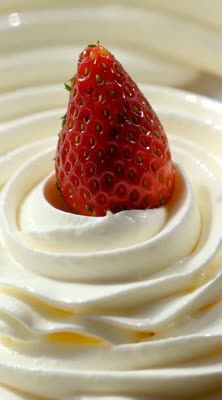
Workflow recipe
Cinematic slow motion of a ripe strawberry sliding down a swirl of whipped cream. Cream folds softly as the berry glides. High-contrast lighting, glossy reflections and a creamy bokeh background.
- Frame rate
- 24 fps
- Duration
- 10 seconds
- Style
- Cinematic product shot
How to revise a failed prompt
Subject changes shape: use an approved reference image, reduce rotation and motion, and state the exact feature that must remain stable.
Too much happens: remove secondary actions and keep one subject action plus one camera move.
Camera drifts: describe the positive camera state—locked, fixed point, slow push or left-to-right tracking—and give the subject something visible to do.
Unexpected cut: remove shot-change language, request one continuous shot and fit the action to the selected duration.
Hands or interactions fail: simplify the contact, shorten the action, choose an angle with fewer occlusions or use real footage when the interaction must be accurate.
Product text warps: use a reference image and restrained motion, or composite the real packshot and final typography in an editor.
Loop jumps: reduce independent motion and trim in an editor; asking for a loop does not prove the last and first frames match.
Text-to-video versus image-to-video prompts
In text-to-video, describe both appearance and motion because the model must create the scene. In image-to-video, the image supplies appearance and composition; concentrate the prompt on what changes over time. If exact product or identity preservation matters, use an authorized reference and inspect every frame.
A controlled prompt test
Choose one difficult shot. Include the identity, interaction, text or camera behavior that matters to the real project.
Lock comparable settings. Keep source, duration, aspect ratio and model fixed while testing wording.
Start with the minimum prompt. Subject action and camera are enough for the first attempt.
Change one variable. Add or revise only the instruction tied to the largest visible error.
Save every attempt. Record prompt, model, seed if exposed, settings, charge, output and why it passed or failed.
Count accepted-output cost. Include rejected generations, correction time, licensing and finishing.
Frequently asked questions
Not automatically. Extra instructions can conflict or obscure the main action. Start with the minimum observable shot, then add one detail after inspecting the result.
Use a lens or camera term only when it communicates a visible result you need, such as macro framing, shallow depth of field or handheld motion. A model may treat numeric camera metadata as style language rather than a physical capture setting, so judge the output instead of assuming the number was obeyed.
No prompt guarantees exact preservation. Use an authorized reference, limit motion and occlusion, inspect every frame and use conventional compositing or editing when exact identity, label or geometry is required.
Reduce the number of simultaneous events, use plausible motion, keep the camera instruction clear and avoid excessive effects. Real source footage remains the strongest choice when the video must prove a product action or factual event.
For more shot patterns, use the AI video examples library. For camera vocabulary, compare the AI video camera angles and prompts.
A realism checklist before you spend another generation
A prompt is ready when another person can picture one shot without inventing missing decisions. Name one subject, one observable action, a concrete setting, one camera behavior, lighting, duration or aspect ratio, and only the invariants that would make the output unusable if changed.
Remove adjectives that cannot be checked. “Cinematic,” “beautiful,” and “professional” do not tell the model which lens behavior, light direction, blocking or movement to create. Replace them with observable instructions: a slow waist-height dolly, late-afternoon side light, shallow depth of field, or a locked tripod shot.
Keep the first attempt short. Review subject identity, required objects, action, camera, lighting, background stability, hands, faces, text and continuity. Pick the single most expensive failure, change only the instruction tied to it, and generate again. Changing five things at once hides which instruction helped.
Four prompt pairs: vague versus testable
Vague: “A cinematic luxury watch ad.” Testable: “A brushed-steel wristwatch remains centered on black stone while the camera makes one slow 30-degree arc; hard white rim light traces the bezel; engraved brand text remains unchanged; six-second 16:9 shot.”
Vague: “A realistic woman walking in a city.” Testable: “One adult woman in a red coat walks toward camera on a wet sidewalk at dusk; shoulder-height handheld camera retreats at her pace; storefront reflections move naturally; face, coat and street layout remain consistent.”
Vague: “Epic product reveal.” Testable: “A closed matte-white package sits on a clean studio table; the lid rises once while the camera slowly pushes in; product shape and printed label do not change; soft overhead light; no extra objects; five seconds.”
Vague: “A documentary street scene.” Testable: “Fictional market street at sunrise, observed from a fixed curb-level camera; three vendors arrange fruit while two cyclists cross once in the background; natural overcast light; no logos or recognizable real people.”
How to measure whether a prompt improved
Define the acceptance check before generating. For product footage, that may be correct geometry, label, color, action and camera. For a character shot, it may be identity, clothing, pose, expression and continuity. Save the prompt, model, settings, input assets and every candidate you count.
Report accepted outputs divided by total attempts, then record repair time. A prompt that creates one usable clip in two attempts is more useful than one that creates a spectacular frame after ten untracked retries. Do not call a pattern proven from a hand-picked success; keep the failed outputs or describe the result as an example.
Continue Reading

How to prompt AI videos: a practical 10-step guide

10 best AI video generators in 2027: models, features, and costs

Best free AI lip sync tools (2027): limits & watermarks

Best AI image editing models with reference images (2027)

