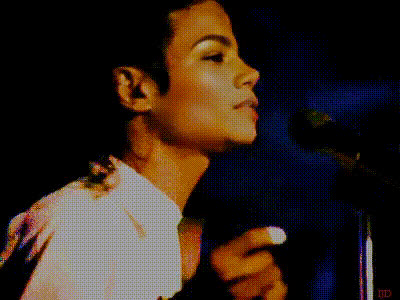
Jackson Five Live - The Robot
face-swap
Any aspect ratio
Tags
music videoJackson Five Live – The Robot (Face Swap Video Template)
Overview
Step into a classic 1970s TV performance and put yourself on stage with Michael Jackson and his brothers. The “Jackson Five Live – The Robot” template uses Magic Hour’s advanced AI face swap to place your face (or your friends’, fans’, or characters’) onto the Jackson Five as they perform “Dancing Machine” and Michael debuts his iconic robot dance.
This template is built on Magic Hour’s Face Swap Video engine, so you get:
- High‑quality, frame‑accurate face swapping
- Automatic lighting and color matching for realistic results
- Fast rendering suitable for social, ads, or prototypes
What You Can Do With This Template
This template is designed for creators, marketers, and builders who want a fast way to test ideas and produce shareable content. Common use cases:
- Social campaigns: Turn your team, customers, or influencers into members of the Jackson Five for promo clips or launch teasers.
- Creator content: React videos, nostalgia posts, “What if I was in the 70s?” content, and fan tributes.
- Product or brand storytelling: Put your mascot, avatar, or AI‑generated character on stage to introduce a feature or event.
- Character and IP testing: Quickly prototype how a new character performs in a live‑action setting before you invest in custom shoots.
If you want to go beyond this template, you can also:
- Convert a still image of yourself into a performance using AI Talking Photo.
- Generate original promo art or thumbnails with the AI Image Generator or Thumbnail Maker.
- Clean up or enhance assets with the AI Image Editor and AI Image Upscaler.
How to Remix This Template in Magic Hour
You can recreate or remix this experience directly in Magic Hour using Face Swap Video. The flow is lightweight and optimized for busy teams:
- Start with Face Swap Video
Go to Face Swap Video. Upload the Jackson Five performance clip (or your own performance video in a similar style) as the base video. - Upload your faces
Add the faces you want to appear on stage—your own, your team, actors, avatars, or AI‑generated characters (for example, from the Avatar Generator or AI Character Generator). - Assign faces to performers
Map each uploaded face to the on‑screen performers (e.g., you as Michael, teammates as the other brothers). Magic Hour will track expressions and movement across the full video. - Refine and preview
Use the preview to check identity consistency, eye alignment, and expressions. If needed, upload sharper source photos or upscaled images via the AI Image Upscaler for more detailed swaps. - Export and repurpose
Download the finished video and repurpose for:- Short‑form vertical clips (TikTok, Reels, Shorts)
- Horizontal edits for YouTube and landing pages
- GIF snippets using the AI GIF Generator or Face Swap GIF
If you prefer a different source video (for example, a modern dance clip or your own choreography), you can still follow the same workflow—this template is essentially a curated example built using Magic Hour’s core Face Swap capabilities.
Deepen the Remix: Combine With Other Magic Hour Tools
To build more advanced variations of this template:
- Change the performance style: Use Video‑to‑Video to restyle the performance into anime, comic book, or futuristic aesthetics, then apply face swap on top.
- Animate stills: If you only have photos, convert them into performance videos with Image‑to‑Video, then remix those clips with Face Swap Video.
- Sync to different music: Create lip‑synced variations using the Lip Sync template, swapping in your own soundtrack or VO, then layer face swapping for a full custom music video effect.
- Generate retro artwork: Design 70s‑style posters or album covers around your swapped performance with the Album Cover Generator, AI Art Generator, or Graffiti Generator.
About the Jackson Five, “Dancing Machine,” and the Robot
The Jackson Five (later The Jacksons) were formed in Gary, Indiana in the early 1960s by brothers Jackie, Tito, Jermaine, Marlon, and Michael Jackson. Signed to Motown in 1969, they became one of the defining pop‑soul acts of the 1970s, with hits like “I Want You Back,” “ABC,” and “The Love You Save.” Their blend of tight harmonies, choreography, and stagecraft helped shape modern pop performance.
“Dancing Machine,” released in 1974, was a major hit for the group and earned a Grammy nomination for Best R&B Performance by a Duo or Group. It is widely referenced in dance history for popularizing Michael Jackson’s “robot” dance on television, particularly through performances on shows such as Soul Train. The robot itself predates Michael—tracing back to mime and popping traditions—but his performances helped bring it into mainstream pop culture and paved the way for later street dance styles and his own signature moves.
Best Practices for High‑Quality Face Swap Performances
To get the most out of this template or any remix you build:
- Use clear source photos: Frontal, well‑lit faces with minimal occlusion (no heavy shadows, large sunglasses, or extreme angles) yield more accurate swaps.
- Match age and style where possible: Swapping faces of similar age and skin tone to the original performers often looks more realistic. For stylized or surreal outputs, you can intentionally break this rule.
- Upscale low‑res photos: If your headshots are small or compressed, run them through the AI Image Upscaler before swapping.
- Refine identity first, then iterate: Once you have a clean, believable swap, duplicate the project and experiment with styles, overlays, or different audio tracks.
Ethical & Legal Considerations
Always respect likeness rights, copyrights, and platform policies when using AI face swap technology:
- Only use faces you have permission to use (your own, collaborators, consenting customers, or properly licensed assets).
- Be transparent with audiences when content is AI‑generated or manipulated, especially in advertising or political contexts.
- Follow the terms of use of the platforms where you publish your content.
For parody, homage, or educational content inspired by artists like the Jackson Five, consult relevant copyright and fair‑use guidelines in your jurisdiction if you plan commercial campaigns.
Who This Template Is For
- Creators & influencers: Add a high‑production “throwback” piece to your content calendar with minimal setup.
- Marketing & growth teams: Rapidly prototype nostalgic or music‑driven concepts for launches and A/B test different characters or personas.
- Founders & product teams: Validate narrative ideas—like a “retro stage” brand story—before commissioning original shoots.
- Developers building with AI: Use this as a reference pattern for combining face swap, video‑to‑video, and lip sync in your own workflows.
Next Steps
To create your own “Jackson Five Live – The Robot” experience:
- Open Face Swap Video.
- Upload the performance clip you want to use.
- Add and assign your faces.
- Preview, iterate, and export.
From there, you can extend the project with Lip Sync, Video‑to‑Video, or visual design tools like the Album Cover Generator to build a complete, retro‑inspired campaign around your AI‑powered performance.