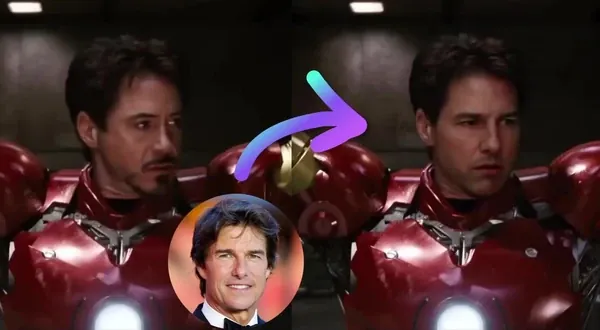
Characters
Upload photos of a person once and reuse them consistently across every Magic Hour tool
Trusted by teams at
How Characters Works
Save a person once and reuse them across every tool
1

Upload reference photos
Add 1–12 clear photos of one person. Use photos from different angles with good lighting for best consistency across generations.
2

Name your Character
Give the person a name so you can find and select them quickly across any project or tool.
3

Magic Hour builds a reference
We automatically generate a combined collage from all uploaded photos, used in tools that support multi-image likeness.
4

Select them in any tool
Open Text to Video, Image to Video, AI Image Editor, or AI Image Generator and choose your Character from the References panel.
5

Create with a consistent face
Your Character's likeness is applied to every generation — same person, same face, every time.
Characters Use Cases
See how a saved Character keeps the same person consistent across every scene, tool, and campaign.
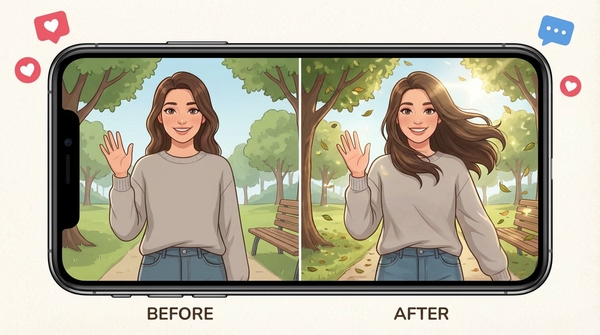
Use one Character across multiple AI-generated videos and images without re-uploading photos or re-describing the same person every time.
Build a recurring subject for episodic videos, social series, or multi-part campaigns where the same person needs to appear across every clip.
Use one consistent person as a brand face across product videos, ads, and social content — without booking or rescheduling shoots.
Upload photos of a creator, founder, model, or team member once. Select them in any tool whenever you need them.
Skip re-uploading photos for every generation. Select a saved Character and go directly to creating.
Use the same Character in Text to Video for scripted scenes, Image to Video for animated portraits, and AI Image Editor for styled compositions — all from one saved reference.
Save different people as separate Characters and pull the right one into the right tool for each scene or campaign.
Save your AI influencer — created in the AI Influencer Generator — as a Character and generate consistent photos, videos, and reels from a single persona.
Why Creators Love Characters
Stop re-uploading the same photos for every generation. Save a person once and select them instantly across every Magic Hour tool.
Upload once, use everywhere
Save reference photos once and select your Character in any supported tool instantly.
Consistent face across every generation
Text to Video, Image to Video, AI Image Editor — same person, every time.
Up to 12 reference photos
More angles means stronger likeness consistency across your generations.
Auto-built collage reference
Magic Hour combines all your photos into one optimized reference automatically.
Works in Text to Video and Image to Video
Select your Character in the References panel. Their primary image is used for single-face tools.
Works in AI Image Editor and AI Image Generator
The auto-collage is used as a multi-image likeness reference for richer, more consistent results.
Characters Features
One saved reference, applied consistently across every supported tool

Upload once, use everywhere
Add reference photos once and select the same Character across Text to Video, Image to Video, AI Image Editor, and AI Image Generator.

Up to 12 reference photos
More angles and expressions give the AI more to work with for better consistency across generations.

Auto-generated collage reference
Magic Hour automatically combines all reference photos into a single collage, optimized for tools that use multi-image likeness.

Primary image control
Set any photo as the primary image. Used as the Character thumbnail and in tools that use a single face reference like Text to Video and Image to Video.

Works across every supported tool
Characters plug directly into supported tools with no re-uploading, no re-describing, and no starting over between projects.
Edit anytime
Add or remove photos, swap the primary image, or rename a Character at any time. The collage reference updates automatically.
Characters FAQ
A Character is a saved person you upload once and reuse across Magic Hour tools. Add 1–12 reference photos, give them a name, and select them directly in Text to Video, Image to Video, AI Image Editor, and AI Image Generator for consistent results every time.
You can upload between 1 and 12 photos. For best results, use clear, well-lit photos of one person from multiple angles. More variety across angles and expressions generally produces stronger consistency.
Clear photos with good lighting, a visible face, and different angles work best. Avoid blurry photos, group photos, sunglasses, masks, heavy filters, and photos where the face is obscured.
The primary image is used as the Character's thumbnail and as the face reference in tools that support a single image, like Text to Video and Image to Video. The first photo you upload is set as primary by default. You can change it at any time.
When you upload multiple photos, Magic Hour automatically generates a side-by-side collage of all reference images. This collage is used in AI Image Editor and AI Image Generator, which support multi-image likeness for richer consistency.
Characters currently work in Text to Video, Image to Video, AI Image Editor, and AI Image Generator. More tool support is coming.
Yes. You can add or remove photos, change the primary image, and rename a Character at any time. The collage reference updates automatically when you make changes.
Free users can save 1 Character. Creator plans include up to 5 saved Characters, Pro includes up to 15, and Business includes unlimited saved Characters. Each Character can include 1–12 reference photos and can be edited, renamed, or deleted at any time.
Go to /create/characters to view, create, edit, and delete your saved Characters.
Yes. Characters are designed for real people — creators, founders, models, brand spokespeople, or anyone you want to appear consistently across your content.
Yes. AI influencers created with Magic Hour's AI Influencer Generator are saved directly to your Characters library and work the same way across every tool.
We Value Your Privacy & Data Security, Always
Commercial use, training, deletion, retention (1 day), and security. Retention:1 day
Commercial use
Paid plans permit commercial use of outputs. Free users can preview and test.
No training
We do not use your uploads or outputs to train our models.
Delete anytime
You can delete your content or account at any time. Deletion removes content from active storage immediately.
Security
Encrypted in transit and at rest. Access is restricted for operations and support.